

The best rugged tablet for tractors is rarely the model with the longest specification list. It is the unit that fits the cab, remains readable during a full shift, starts and shuts down with the vehicle, connects to the required equipment, and can be serviced without rebuilding the installation.
Farm machinery creates a demanding mix of dust, moisture, vibration, sunlight, limited mounting space, and seasonal urgency. A consumer tablet in a protective case may work for a trial, but a production installation also needs vehicle power, sealed connectors, a rigid bracket, cable retention, controlled software, and predictable support. This guide turns those needs into a practical selection and pilot checklist.
1. Define the tractor and the job
Begin with the machine, not the catalog. Record the tractor or farm equipment model, electrical system, cab dimensions, expected working hours, mounting surface, operator viewing distance, and the controls that must remain unobstructed. Photograph the proposed location from the seated operator's eye level.
Then describe the application. A simple work-order terminal has different needs from a guidance display, implement monitor, camera screen, or field-data computer. List every screen, alarm, physical input, camera, antenna, cable, wireless connection, and vehicle message. Note which tasks must continue without network coverage.
This exercise prevents overbuying and exposes hidden dependencies. A tablet may have enough processing power, yet fail the project because its connector exits into a window frame or because the bracket blocks a hydraulic lever.
2. Choose screen size by viewing distance
A 7- or 8-inch terminal can fit close to the operator in a compact cab and works well for focused tasks. A 10-inch unit provides more room for maps, alarms, and split views. A 12-inch display can support multiple cameras or complex implement information, provided the cab has enough space.
Print application screenshots at actual size or run them on a sample. Check the normal viewing distance, sun angle, touch target size, and whether the operator wears gloves. Test both day and night. Brightness is important, but reflections, display coating, dimming range, viewing angle, and application contrast all affect readability.
3. Ruggedness should be documented
Terms such as “rugged,” “industrial,” and “vehicle-mounted” describe a category; they do not replace test evidence. Ask for the ingress rating, operating and storage temperature, vibration or shock reference, connector design, and the configuration covered by the test.
IP66 can be useful for equipment exposed to dust and water jets under defined conditions. It does not guarantee that an open service port, a loose connector, or a poorly sealed cable entry will survive washing. Review the complete installation and keep unused ports sealed.
Temperature deserves practical testing. A closed cab in direct sun may become much hotter than the weather report. Run the application, wireless radios, and camera streams after the device reaches a steady operating temperature. Check for dimming, touch changes, restarts, or performance throttling.
4. Vehicle power is part of the product
A vehicle mounted rugged tablet should be designed for the machine's electrical behavior. Confirm input range, ACC signal, fuse, grounding, reverse-polarity protection, transient handling, and current draw when the ignition is off. A 9–36V input can cover many 12V and 24V vehicles, but the harness still needs the correct wire size, connector, protection, and routing.
Define boot and shutdown behavior with the software team. The application may need to reopen the previous task, save local records before power removal, or remain awake briefly after ACC turns off. Test rapid key cycles and engine cranking. Unexpected resets and damaged job files often trace back to this interface.
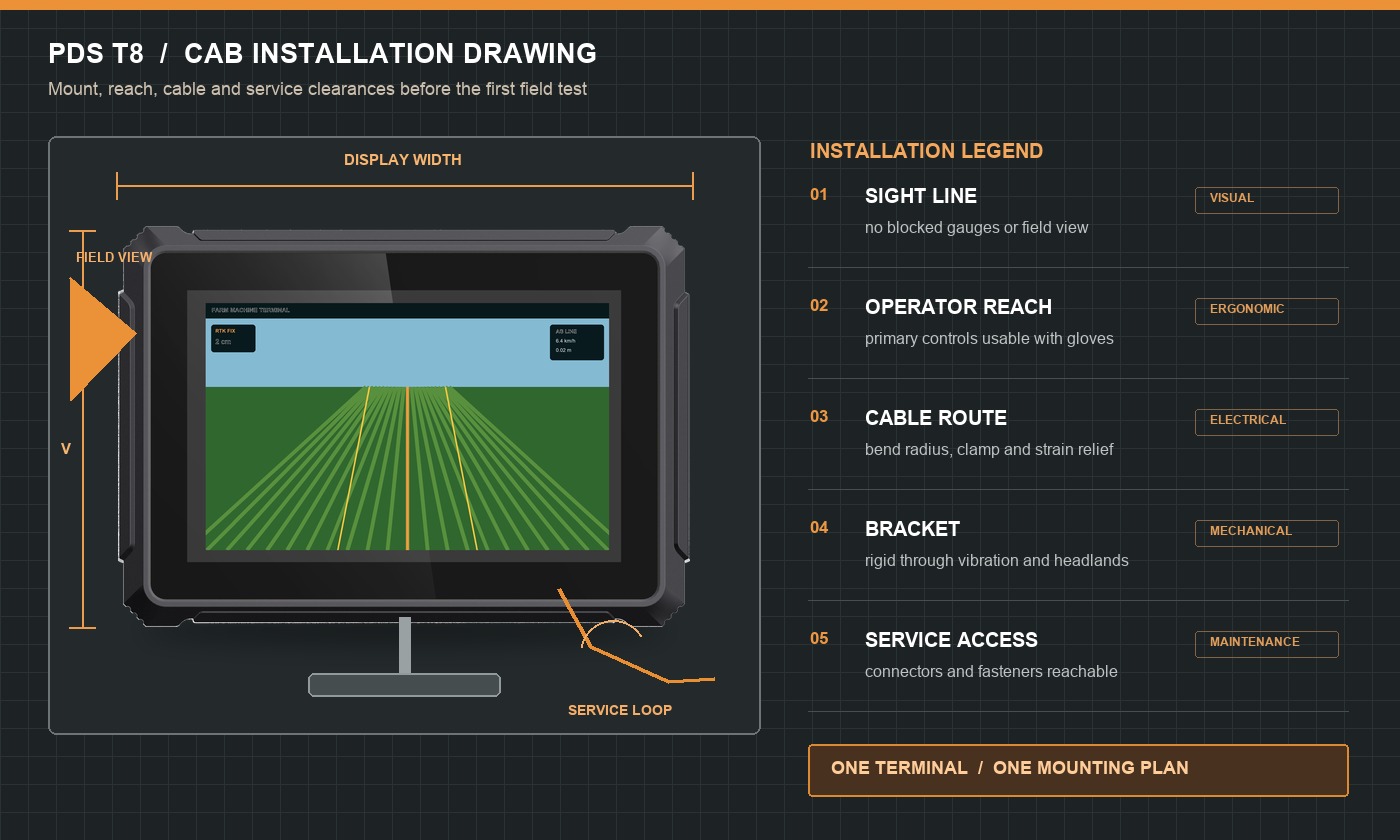
5. Mounting and cable routing
A good bracket keeps the screen stable without blocking visibility or controls. Avoid long arms that magnify vibration. Verify that the mounting surface can carry the terminal over rough ground. If the tablet is intended to be removable, define the latch, connector handling, and storage process.
Leave room behind and beside the device for connectors and cable bend radius. Route harnesses away from pedals, steering joints, sharp edges, hot surfaces, and high-current cables. Use strain relief so vibration is not transferred directly to the connector. Labels at both ends reduce installation and service errors.
A rugged tablet for tractors should leave enough physical clearance for an installer to connect, inspect, and replace the harness without removing unrelated cab parts.
6. Interfaces for farm machinery
List interfaces by purpose. A camera connection needs the correct video standard, connector, power arrangement, channel count, and application behavior. A CAN connection needs channel count, bitrate, termination, isolation, message definitions, and software access. RS232 or RS485 devices need the right electrical format and protocol.
Ethernet may support cameras, controllers, or service tools. USB can be useful for logs and updates, but the port needs a sealing and access plan. Wireless features should be tested where the machine works, including areas with poor coverage. If GNSS or RTK is required, specify the receiver, antennas, correction source, protocols, and quality-state reporting.
7. Software and lifecycle support
Choose Android or Linux according to the application, drivers, security requirements, update method, and developer experience. Ask for the exact production version rather than assuming that all units with the same model name use the same image. Confirm SDKs, device APIs, camera support, serial or CAN drivers, kiosk behavior, and recovery tools.
Agricultural equipment may remain in service for years. Agree on component-change notification, software support, warranty, repair process, spare strategy, and configuration traceability. If a processor, display, modem, or storage component changes, the supplier should identify whether software or validation work is required.
8. Comparison checklist
| Area | Questions for the supplier | Pilot evidence |
|---|---|---|
| Cab fit | Dimensions, bracket, connector clearance, cable exits? | Nothing blocks sight lines or controls; mount remains stable |
| Display | Brightness, dimming, touch mode, viewing angle? | Readable in sun and comfortable at night; gloves work |
| Environment | IP rating, temperature, vibration, connector test evidence? | Stable after heat, dust, rough ground, and cleaning routine |
| Power | Input range, ACC, protection, standby current, shutdown? | Passes cranking, rapid key cycles, and safe job saving |
| Interfaces | Exact pinout, protocols, drivers, camera standards? | All target equipment runs simultaneously |
| Lifecycle | BOM control, OS support, repair, warranty, PCN? | Production configuration and acceptance record are frozen |
9. Recommended PDS configurations
For an 8-inch vehicle-mounted application, the PDS T8 provides a 1280×800 display, Android 10, 4GB RAM and 64GB storage, IP66 protection, 9–36V vehicle power, and configurable CAN, serial, Ethernet, camera, and wireless connections. It is a useful starting point when the cab needs more area than a compact 7-inch terminal without moving to a large HMI.
The PDS T7 suits focused guidance and space-limited installations. Its front function keys can be useful for frequent actions with gloves. Android or Linux options and optional UM982 RTK allow the platform to be configured around the application.
The PDS T10Pro is a candidate for more demanding Android applications, RTK, radio corrections, cameras, or richer vehicle interfaces. For multi-view precision-agriculture work, the PDS T12 adds a 12.1-inch screen and broad CAN, serial, Ethernet, GPIO, and camera connectivity.
Specifications can vary by configuration. Ask PDS Technology to identify the exact processor, memory, storage, OS, GNSS, modem or radio, connectors, harness, and accessories in the quotation. Compare that BOM with the unit used for the pilot.
10. Recommended configurations by task
- Compact guidance: 7-inch terminal, physical keys, optional RTK, rigid short mount, and a simplified guidance interface.
- General farm-machine HMI: 8-inch Android terminal, 4GB/64GB class memory and storage, vehicle power, required CAN or serial ports, and one or two cameras as needed.
- Precision-agriculture control: 10-inch terminal with the production application, GNSS/RTK, controller interface, wireless synchronization, and controlled ignition behavior.
- Large multi-view operation: 12-inch terminal for maps, implement data, alarms, and several cameras, after the cab layout confirms safe visibility.
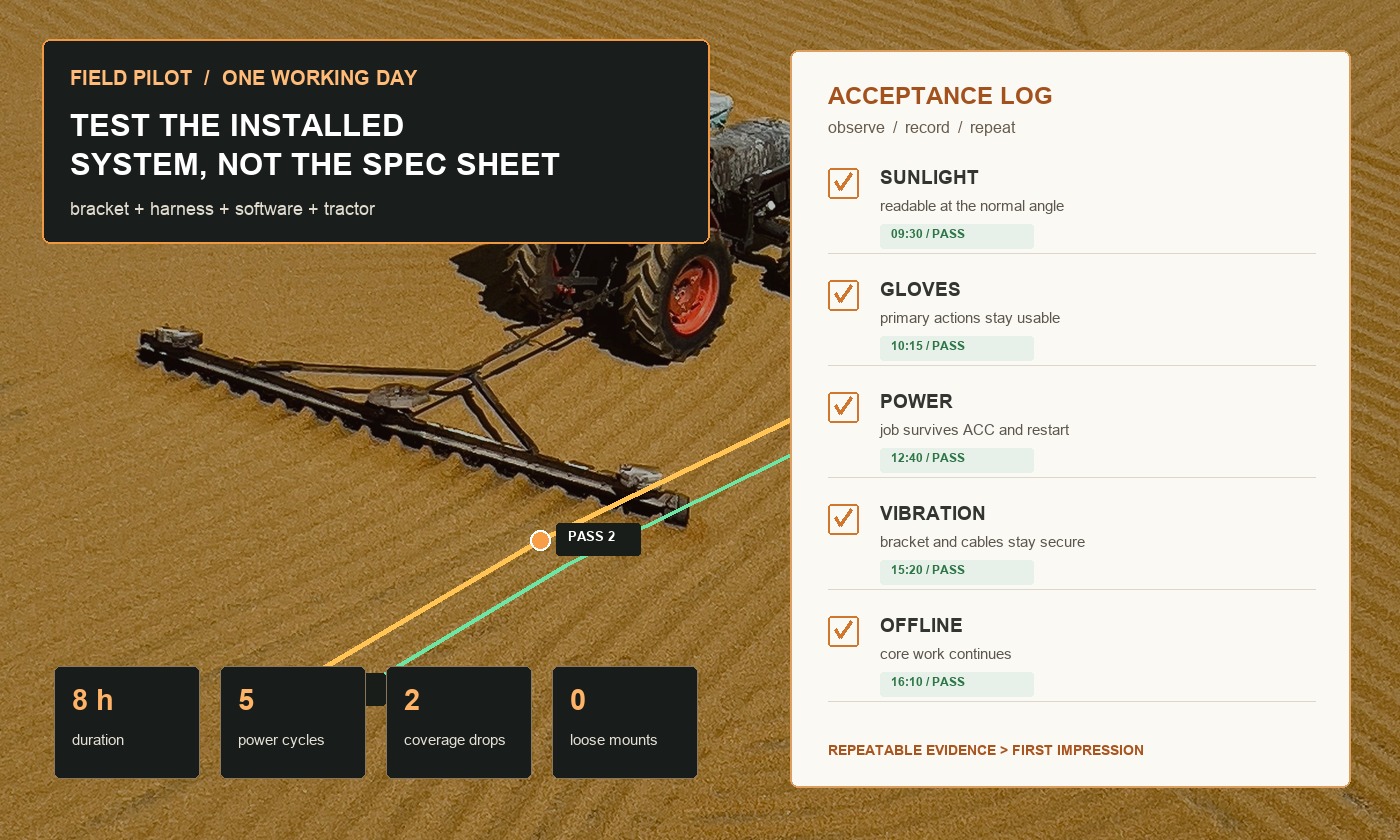
11. Run a one-day field pilot
Use the final tablet, bracket, harness, antennas, accessories, and software image. Start before the first job and continue through normal work. Check sunlight readability, glove operation, vibration, connector retention, temperature, network loss, camera switching, and application responsiveness.
Repeat ignition cycles and restart the engine while the application is active. Disconnect one peripheral at a time and confirm that the error is understandable. Work offline, then restore coverage and check synchronization. At the end of the day, inspect the mount and cable routes and verify that job data is complete.
A pilot should produce a short acceptance report with photos, installation measurements, hardware serial number, BOM, OS and application versions, test conditions, failures, fixes, and final limits. That record becomes the baseline for production and future service.
Frequently asked questions
Can a consumer tablet be used in a tractor?
It may support a short trial, but long-term use requires careful review of power, temperature, vibration, mounting, connector retention, water and dust exposure, software control, and support. A purpose-built vehicle terminal reduces several of those integration risks.
Is IP66 enough for farm machinery?
It can be an appropriate starting point, but it does not cover every hazard. Evaluate connectors, cable entries, chemicals, pressure washing, vibration, temperature, UV exposure, and the exact mounting location.
Should the tablet be removable?
That depends on theft risk, storage, operator workflow, connector life, and service needs. A removable design needs a durable latch, protected connectors, and a repeatable setup process. A fixed unit usually simplifies wiring and daily use.
What should a buyer send with an inquiry?
Send the vehicle model, cab drawing, application, screen preference, OS, power, interfaces, cameras, GNSS or RTK needs, environmental conditions, mounting idea, pilot quantity, annual forecast, customization requests, and target schedule.
Select the complete installation
The best rugged tablet for tractors is proven by the mounted, powered, connected system. A sensible selection process measures the cab, maps the workflow, freezes the I/O, and runs a demanding field pilot. That work protects operators and reduces expensive surprises after rollout.
Browse the PDS rugged vehicle terminal range, review the precision agriculture solution, or contact PDS Technology for an installation review, product recommendation, harness, software, or OEM/ODM project.
Contact us
📧Email:[email protected]
📞Tel:+86 13421822024
🌐Website: www.szpds.com
Disclaimer
The information in this article is for reference only. PDS Technology Co., Ltd. assumes no responsibility for errors, omissions, or suitability of the content for specific applications. Product specifications are subject to change without notice. Buyers should verify all technical details with our team before use.
About PDS Technology
PDS Technology is a leading OEM/ODM manufacturer of high-precision RTK GNSS terminals and vehicle computers, serving agriculture, construction, mining, taxi, and logistics industries since 2011.
With 15+ years of automotive-grade R&D experience, we offer rugged, multi-OS (Android/Linux/OpenHarmony) devices featuring RTK centimeter-level positioning, IP66 protection, and AI-ready performance. Our IATF16949-certified factories have produced over 100,000 units deployed globally, holding 30%+ of China's agricultural auto-steering terminal market. We export to Japan, the US, UK, Turkey, Russia, and beyond.





