

Choosing a rugged GNSS terminal for an outdoor vehicle starts with the operating environment, not the screen size. A tractor works through dust, vibration, direct sun, and seasonal wash-down. An excavator adds shocks, metal structures, and restricted antenna views. A mining truck may run long shifts with several cameras and weak cellular coverage. The terminal must remain readable, connected, and recoverable in those conditions.
The selection process is therefore a fit check between six systems: enclosure, display, vehicle power, GNSS and antennas, machine interfaces, and software. RTK may be necessary for precision work, but rugged hardware is just as important because accurate positioning is not useful when the display resets, the connector loosens, or the operator cannot see a warning. The right rugged GNSS terminal must pass all six checks together.
Start with the outdoor vehicle, not a generic “rugged” label
Write a short operating profile for the target machine. Include the vehicle voltage, ignition behavior, mounting location, hours per shift, seasonal temperature, vibration, dust, water exposure, cleaning method, cab visibility, gloves, cameras, antennas, and network coverage. Then note what the operator must do when GNSS or RTK becomes unavailable.
| Vehicle environment | Typical terminal pressure | Selection priority |
|---|---|---|
| Tractor or sprayer | Sunlight, dust, vibration, long field passes, guidance workload | RTK status, readable display, CAN/serial, sealed connectors, stable bracket |
| Excavator or loader | Shock, boom movement, cameras, metal reflections, restricted cab space | Mount strength, camera inputs, antenna placement, glove operation |
| Mining truck | Continuous vibration, dust, heat, long shifts, limited service access | Power recovery, connector retention, multi-camera layout, offline operation |
| Road construction machine | Open sky changes, grading or mapping, hydraulic vibration | GNSS/RTK availability, vertical requirement, CAN integration, logging |
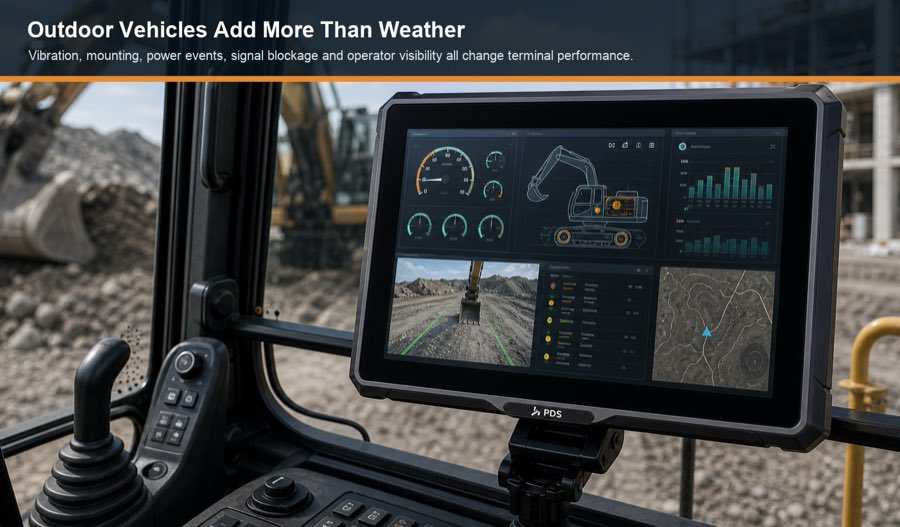
Check ingress protection together with connectors and cables
An IP rating is a starting point. It does not automatically describe chemical resistance, salt, UV exposure, pressure washing, condensation, or a connector left uncapped. Ask which parts of the terminal were tested, whether all covers and mating connectors were installed, and how cable exits should be sealed.
Inspect the installation drawing for downward-facing connectors, cable strain relief, drip loops, service access, and clearance from sharp edges. A sealed enclosure can still fail in the field when water follows a cable into a poorly assembled connector. The harness and bracket should be treated as production components, not accessories chosen after the terminal.
Review temperature as an operating problem
The temperature inside a closed cab can exceed the outdoor air temperature, especially when the display is exposed to the sun. The processor, backlight, modem, charging circuits, and application workload also create heat. Confirm the published operating range, but test the complete application at the expected brightness, network activity, camera count, and CPU load.
Cold operation has different risks. Touch response, LCD behavior, boot time, condensation, cables, and the vehicle battery may change. If the machine starts in winter, measure whether the terminal boots cleanly during engine cranking and whether the application returns to the correct screen after repeated ignition cycles.
Choose a display the operator can read and reach
Brightness is important, but reflections, optical bonding, viewing angle, screen layout, and mounting angle can decide whether the display remains usable. Review actual application screenshots with the terminal positioned at the intended distance. A larger screen helps with guidance, camera mosaics, and machine data; it can also obstruct the windscreen or become harder to support on a vibrating bracket.
Touch controls should be large enough for movement and gloves. Frequently used actions may benefit from physical keys. The operator must also be able to recognize an RTK fixed, float, or correction-lost state at a glance. Do not hide positioning quality in a small status icon.
Test vibration with the final bracket and harness
A vibration reference on a datasheet does not prove that every arm, ball mount, bolt, and cable will survive the vehicle. The complete installation has its own resonance and leverage. Heavy terminals need a bracket with sufficient load capacity, a rigid attachment point, locking hardware, and room for the cable bend radius.
During the pilot, watch for screen movement, connector fretting, intermittent power, antenna-cable strain, and changes in touch behavior. Inspect fasteners after several working days. If the operator keeps adjusting the screen because it moves, the bracket is part of the problem even if the computer itself passes a laboratory vibration test.
Protect the terminal from vehicle power events
Outdoor equipment can use 12V or 24V electrical systems, but nominal voltage does not describe engine cranking, alternator behavior, inductive loads, jump starting, reverse connection, or ignition-off timing. Confirm the terminal's input range and protection, then design the fuse, grounding, ACC signal, harness, and shutdown policy.
The application should save critical data before shutdown. It should also recover if power is interrupted at the worst moment. Test repeated starts with cameras, modem, GNSS receiver, and machine interfaces active. A stable bench supply is useful for development, but it cannot replace the target vehicle test.
Design the GNSS and RTK antenna installation early
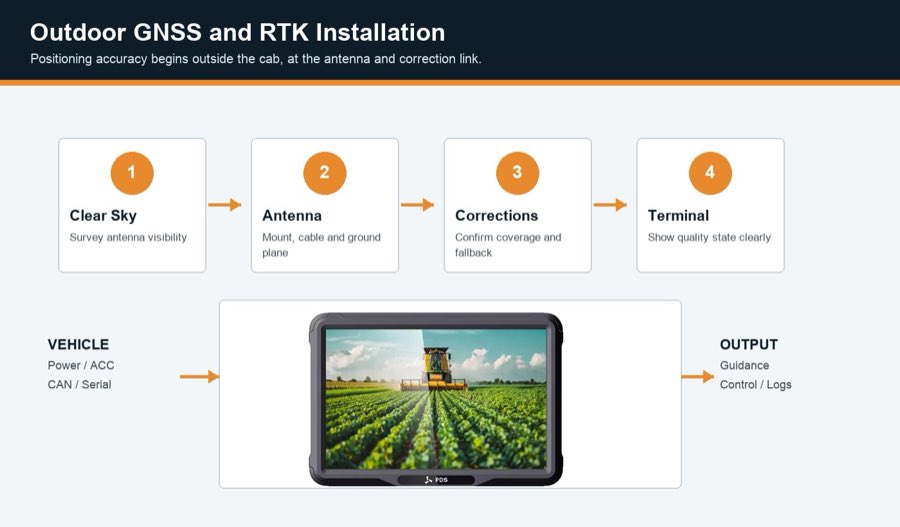
High-precision positioning depends on clean satellite observations and suitable correction data. According to the u-blox RTK overview, receiver hardware, antennas, RTK processing, and corrections work as one solution. For an outdoor vehicle, the antenna should have a clear sky view and a stable mounting point, with cable routing that avoids damage and high-power interference.
Metal structures, the boom of an excavator, trees, buildings, and mine walls can block or reflect signals. Walk the intended route and identify those areas before promising continuous fixed RTK. If correction data arrives over 4G, confirm coverage. If it arrives over radio, confirm frequency, antenna position, range, local regulations, and line-of-sight constraints.
Match machine interfaces and software ownership
List every connection before choosing the model: CAN networks, RS232 or RS485 sensors, Ethernet devices, GPIO, USB, cameras, GNSS output, steering controller, radio, and modem. Then add bitrate, protocol, isolation, termination, pinout, connector, driver, and application owner. “Two CAN ports” is not a complete integration specification.
Software ownership matters outdoors because a field problem often crosses hardware and application boundaries. Decide who can retrieve logs, update firmware, restore a failed unit, change GNSS settings, or diagnose a correction outage. Confirm the OS version and the support period. A long-lived machine project needs controlled updates and a recovery method, not just a downloadable APK.
PDS models for different outdoor layouts
| PDS model | Published outdoor features | Selection note |
|---|---|---|
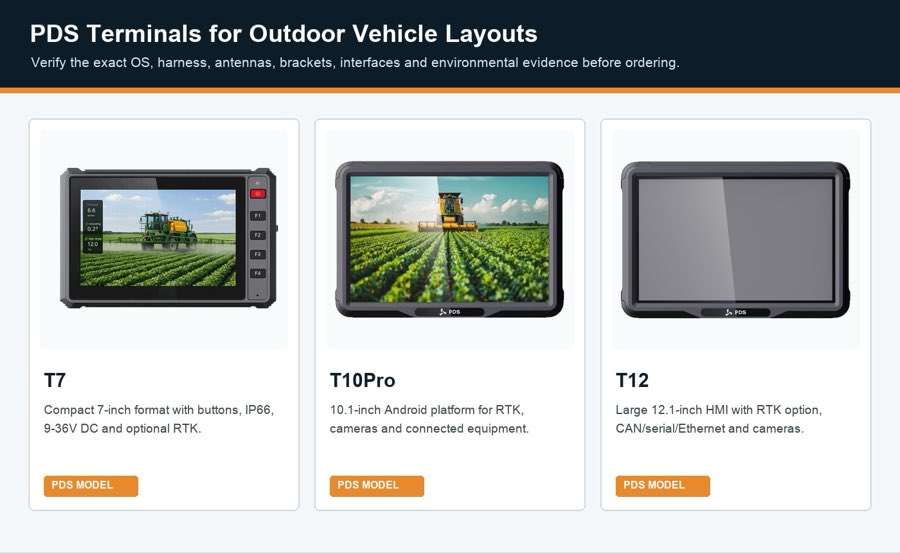
| T7 | 7-inch IPS display, at least 750 cd/m², IP66, -20°C to +70°C, 9-36V DC, optional UM982 RTK | Review for compact cabs, focused screens, and applications that benefit from front function keys |
| T10Pro | 10.1-inch IPS, at least 750 cd/m², IP66, -20°C to +70°C, 9-36V DC, optional RTK and radio | Review for Android applications, camera recording, agriculture, and moderate-size cab layouts |
| T12 | 12.1-inch IPS, at least 750 cd/m², IP66, -20°C to +70°C, 9-36V DC, optional RTK, multiple vehicle and camera interfaces | Review for large tractors and heavy equipment where several views or data panels must remain visible |
PDS product pages provide a useful starting specification. Before ordering, confirm the exact RTK module, OS image, modem bands, harness, antenna set, bracket, interface combination, test evidence, and any OEM/ODM change that applies to the production unit.
Run an outdoor acceptance test
- Install the final bracket, harness, antennas, and production-length cables.
- Operate at full display brightness with all planned cameras and communications active.
- Repeat hot and cold starts and record boot, application launch, and GNSS initialization times.
- Drive the normal route, including tree lines, buildings, slopes, and other obstruction zones.
- Interrupt correction data and confirm the warning, fallback, and recovery behavior.
- Check touch and physical controls with gloves and vehicle movement.
- Inspect fasteners, cables, seals, and connectors after vibration exposure.
- Verify offline operation and data synchronization after network coverage returns.
- Save logs, photographs, configuration files, firmware versions, and acceptance results.
Warning signs when comparing suppliers
Be cautious when a quotation gives an accuracy number without correction conditions, lists an IP rating without the tested configuration, or promises every interface without a pinout and driver plan. Also investigate unclear component substitutions, missing lifecycle policies, unexplained sample-to-production changes, and a supplier that will not define responsibility for software or integration support.
A capable rugged GNSS terminal supplier should be willing to review the vehicle drawing, application, antennas, correction source, cables, and field acceptance method. A technically careful answer may include limitations. That is usually more valuable than an immediate “yes” to every request.
Frequently asked questions
Does every outdoor vehicle need an IP66 terminal?
No. The required protection depends on the installation. An enclosed climate-controlled cab differs from an open tractor or exposed construction machine. Choose the rating and connector design from the real dust, water, cleaning, and mounting conditions.
Is a sunlight-readable screen enough for outdoor use?
Brightness helps, but reflections, bonding, viewing angle, heat, screen layout, mounting angle, and operator position also affect readability. Test the application in the actual cab at the brightest part of the working day.
Can RTK work when cellular coverage is poor?
It may use a local radio correction link or another supported service, but the receiver, radio, antennas, frequency, protocol, range, and local rules must be matched. The operation should also define what happens when all correction paths are lost.
Which screen size is best for construction equipment?
There is no universal size. A compact display can suit one camera and a simple machine-status screen. Guidance, several cameras, maps, and alarms may justify a 10- or 12-inch model. Use the cab drawing and application layout to make the decision.
Choose from the field inward
A rugged GNSS terminal should be selected from the machine and operating day inward: environment first, then mounting and power, positioning, interfaces, display, software, and supplier support. This order exposes hidden costs early and produces a pilot that can answer whether the device is ready for production.
Explore PDS solutions for precision agriculture and construction and mining, browse the PDS rugged vehicle terminal range, or contact PDS Technology with your outdoor vehicle requirements.
Contact us
📧Email:[email protected]
📞Tel:+86 13421822024
🌐Website: www.szpds.com
Disclaimer
The information in this article is for reference only. PDS Technology Co., Ltd. assumes no responsibility for errors, omissions, or suitability of the content for specific applications. Product specifications are subject to change without notice. Buyers should verify all technical details with our team before use.
About PDS Technology
PDS Technology is a leading OEM/ODM manufacturer of high-precision RTK GNSS terminals and vehicle computers, serving agriculture, construction, mining, taxi, and logistics industries since 2011.
With 15+ years of automotive-grade R&D experience, we offer rugged, multi-OS (Android/Linux/OpenHarmony) devices featuring RTK centimeter-level positioning, IP66 protection, and AI-ready performance. Our IATF16949-certified factories have produced over 100,000 units deployed globally, holding 30%+ of China's agricultural auto-steering terminal market. We export to Japan, the US, UK, Turkey, Russia, and beyond.





