

A rugged computer for mining trucks must live with the haul cycle rather than merely survive beside it. Every trip combines rough roads, long grades, loading impact, dust, bright sun, night operation, electrical noise, repeated ignition cycles, and network gaps. The computer may also carry dispatch tasks, camera views, machine status, operator prompts, route information, and shift records.
That workload makes selection a systems exercise. The display size, processor, memory, and operating system are important, but the project can still fail because the bracket moves, the harness is difficult to service, the application loses a task during shutdown, or a camera view arrives too late. Buyers should evaluate the production-intent installation as one package.
1. Start with the haul-truck duty cycle
Write down the sequence from key-on to key-off: operator login, pre-start inspection, assignment receipt, queueing, loading, loaded travel, dumping, empty return, refueling, shift change, and maintenance. Add abnormal events such as a blocked route, communication loss, camera failure, CAN timeout, low voltage, and an emergency stop.
For each step, identify what the operator sees, which signals drive the screen, what must be stored, and how the system recovers. This prevents the specification from becoming a collection of unrelated component features.
2. Cab installation is a safety and service decision
Mining-truck cabs are large, but usable mounting space is still limited by windows, mirrors, existing instruments, air vents, handrails, and operator movement. Check sight lines from the actual seat position. The computer should be readable without forcing the operator to look away from the road for long periods.
Bracket stiffness is as important as bracket location. Continuous movement makes text hard to read and can work fasteners loose. Review the mounting surface, bolt pattern, fastener retention, cable strain relief, connector access, and the path a technician will use during service. A clean prototype installation that cannot be maintained efficiently will create problems across a fleet.
3. Power design must protect the current task
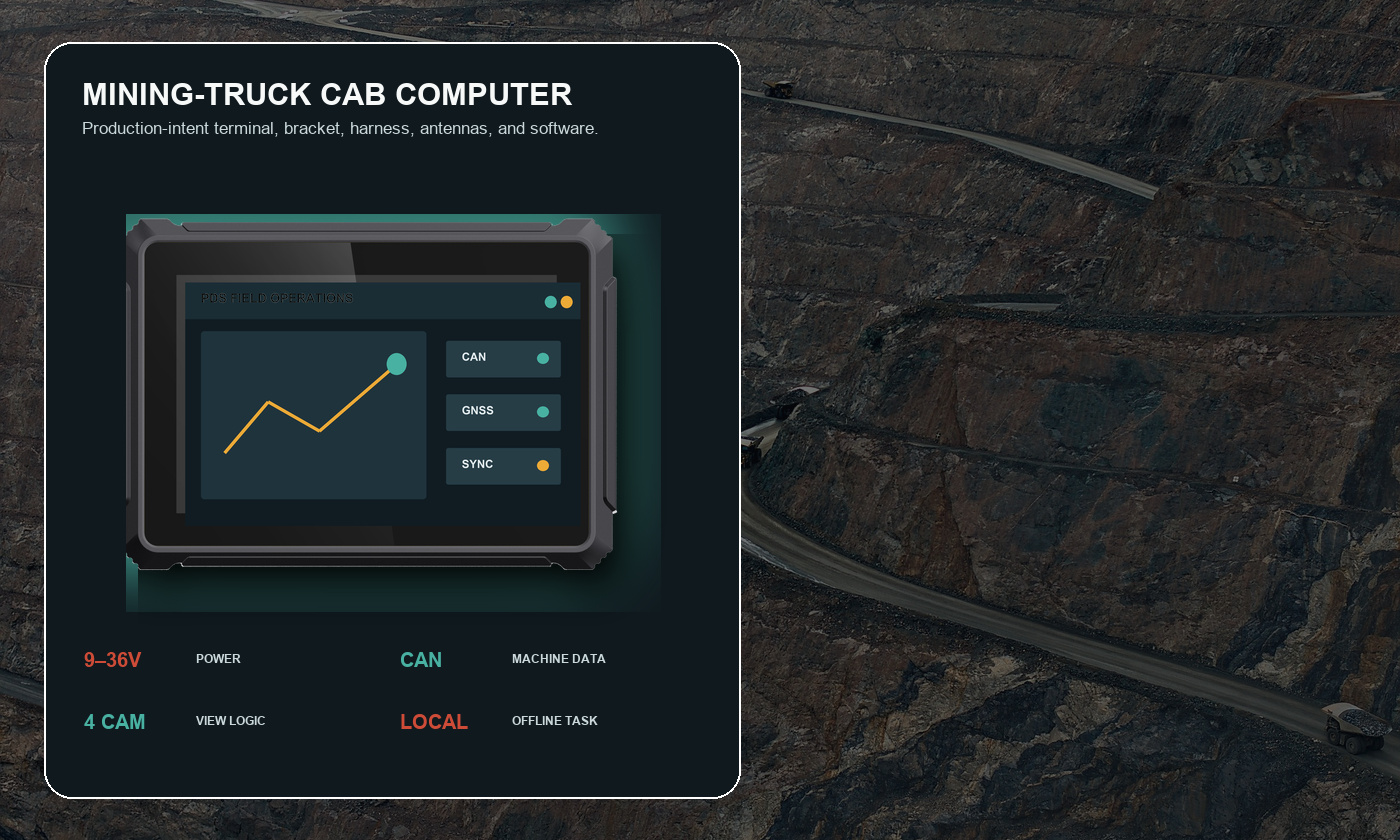
Large machines can expose electronics to deep cranking drops, long cable runs, ground differences, jump-start events, alternator noise, and rapid key cycling. PDS T8Pro and T10Pro list 9–36V DC input. The integration team still needs to define fuse protection, B+ and ACC wiring, grounding, transient limits, standby current, and shutdown timing.
Test with the engine cold and warm. Repeat key cycles. Let the battery condition vary. Remove ACC during an active task and during a queued upload. Confirm that the application saves the right information and that the computer returns to a known state on the next start.
4. Vibration and dust reach the full installation
A rugged enclosure cannot compensate for a weak bracket or an unsupported connector. Ask which vibration and temperature evidence applies to the quoted configuration, then inspect the device, mount, harness, and mating connectors after operation on representative roads.
Ingress protection also depends on installation details. PDS T8Pro and T10Pro configurations list IP66 and a -20°C to +70°C operating range. Verify connector sealing, unused ports, cable orientation, antenna penetrations, and cleaning methods before treating those numbers as deployment approval.
5. Machine data and camera logic
CAN integration may support speed, engine state, hours, alarms, payload-related signals, or other project-defined information. Confirm channel count, bitrate, termination, isolation, connector pins, message ownership, scaling, timeout behavior, and what the operator sees when data becomes invalid.
Camera planning should begin with the movement risk. Rear, side, body, or loading-zone views may need different priorities. Define when a view appears, how long it remains visible, whether the operator can override it, and how a failed camera is reported. The HMI should make the important view obvious without covering a critical machine warning.
6. GNSS, dispatch, and offline operation
GNSS can support vehicle location, zone entry, route review, speed-zone logic, and time synchronization. Higher-accuracy work may need a suitable receiver, antenna position, correction source, and application design. Do not assume that the same antenna location works on every truck body and cab layout.
A rugged computer for mining trucks should not become unusable below a pit wall. Keep the active assignment and essential records locally. Queue uploads with timestamps and stable identifiers, then prove that reconnection does not reorder or duplicate the haul record.
7. Display and HMI choices
An 8-inch screen can suit a focused dispatch or monitoring application. A 10.1-inch screen provides more room for a route, machine values, alarms, and camera tiles. A wider 12.3-inch layout may suit a custom instrument or multi-zone HMI. Screen size should be chosen with the final interface at the real viewing distance.
Evaluate daylight reflections, night dimming, text size, glove use, touch targets, color meaning, and alarm acknowledgement. Important warnings should not rely on color alone. Frequently used actions should require few deliberate touches.
8. Recommended PDS starting points
| Need | Model to review | Why it fits the discussion |
|---|---|---|
| Compact dispatch and machine monitoring | PDS T8Pro | 8-inch Android platform with configurable vehicle and camera interfaces |
| Multi-view truck application | PDS T10Pro | 10.1-inch display, four-camera support, dual CAN, serial interfaces, optional RTK |
| Wide custom HMI | PDS T12 | 12.3-inch display format and multi-OS customization options |
9. A practical validation matrix
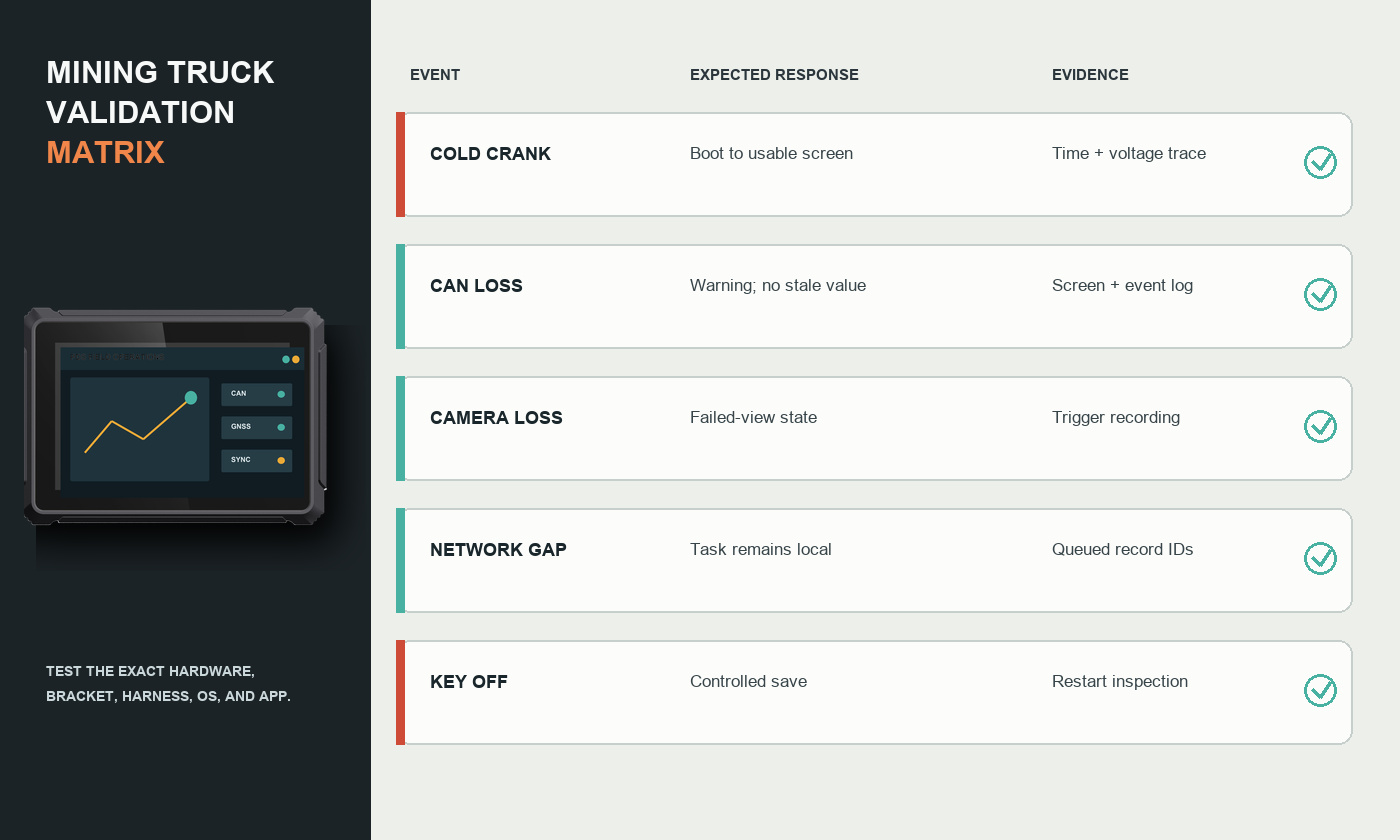
Organize the pilot by event, expected response, evidence, and pass limit. Include cab visibility, bracket movement, cold boot, warm restart, rapid key cycles, low voltage, CAN loss, camera loss, network loss, GNSS interruption, queued upload, storage capacity, shutdown, and service access.
Use the same hardware revision, harness, bracket, antennas, software image, and application that are intended for production. If any element changes after the test, record the change and decide which evidence must be repeated.
10. Application example: a haul-truck dispatch screen
The truck starts with the last approved configuration and checks vehicle-data and camera connections. The operator signs in and receives the next loading assignment. During travel, the screen keeps the route and essential alerts prominent. Reverse selects the required camera view.
When network coverage disappears, the current task remains available and events continue to be timestamped. At the dumping point, the operator confirms the cycle locally. When coverage returns, the terminal sends the missing interval in order. Key-off begins a controlled save and shutdown sequence.
Frequently asked questions
Does every mining truck need RTK?
No. Standard GNSS may be sufficient for general location, routes, and zones. RTK is relevant only when the workflow needs higher accuracy and the correction source, antenna installation, and loss-of-correction behavior are defined.
How many camera inputs should be specified?
Start with blind spots and movement events. The correct number depends on required views, trigger logic, HMI layout, camera standard, cable routes, and failure handling.
Can one computer configuration serve a mixed truck fleet?
Often, but bracket geometry, harness length, power wiring, CAN messages, antennas, and software profiles may differ. Standardize the core terminal where useful and control the vehicle-specific parts.
Select against the real haul cycle
The best rugged computer for mining trucks is the configuration that protects the operator workflow through vibration, dust, network gaps, and power transitions. Freeze the hardware and software only after representative trucks have passed the agreed pilot.
Explore the PDS construction and mining solution, compare 8-inch, 10-inch, and 12-inch vehicle computers, or contact PDS Technology with your truck list and integration requirements.
Contact us
📧Email:[email protected]
📞Tel:+86 13421822024
🌐Website: www.szpds.com
Disclaimer
The information in this article is for reference only. PDS Technology Co., Ltd. assumes no responsibility for errors, omissions, or suitability of the content for specific applications. Product specifications are subject to change without notice. Buyers should verify all technical details with our team before use.
About PDS Technology
PDS Technology is a leading OEM/ODM manufacturer of high-precision RTK GNSS terminals and vehicle computers, serving agriculture, construction, mining, taxi, and logistics industries since 2011.
With 15+ years of automotive-grade R&D experience, we offer rugged, multi-OS (Android/Linux/OpenHarmony) devices featuring RTK centimeter-level positioning, IP66 protection, and AI-ready performance. Our IATF16949-certified factories have produced over 100,000 units deployed globally, holding 30%+ of China's agricultural auto-steering terminal market. We export to Japan, the US, UK, Turkey, Russia, and beyond.





