

Put a 10-inch terminal and a 12-inch terminal side by side in a cab and the difference is obvious, even when both screens use 1280 x 800 pixels. The 12-inch unit is easier to read from farther back. The 10-inch unit leaves more room around switches, vents, and the windscreen, and its bracket has less weight to carry.
When comparing a 10 inch vehicle computer with a 12-inch terminal, the useful question is not simply which screen is bigger. Buyers need to compare the operator's viewing distance, the number of information panels, camera requirements, mounting area, software platform, interfaces, and the cost of installing the complete system.
Start with what the operator must see
For dispatch, route guidance, recording, or routine machine monitoring, 10.1 inches is often enough. A map and one or two camera tiles can remain readable without turning the terminal into the dominant object on the dashboard. When several camera views, guidance lines, alarms, CAN values, and controls must stay visible together, the extra physical area of a 12.1-inch panel becomes useful.
On paper, the PDS T10Pro and T12 share several basics: a 1280 x 800 IPS touch panel, at least 750 cd/m2 brightness, 9-36V input, IP66 protection, and an RTK option. The differences begin to matter when the enclosure, operating system, cameras, and vehicle interfaces are placed on the same project drawing.
| Selection point | PDS T10Pro | PDS T12 |
|---|---|---|
| Display | 10.1-inch IPS, 1280 x 800 | 12.1-inch IPS, 1280 x 800 |
| Published brightness | At least 750 cd/m2 | At least 750 cd/m2 |
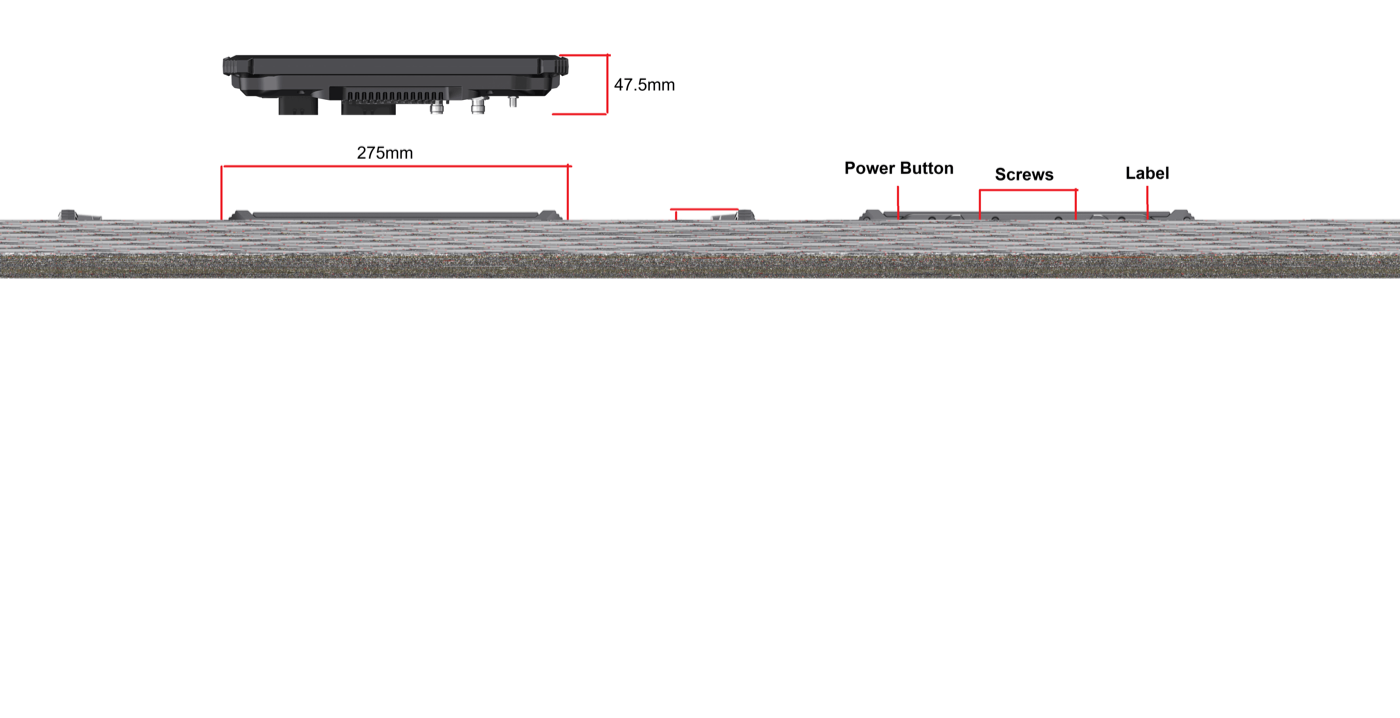
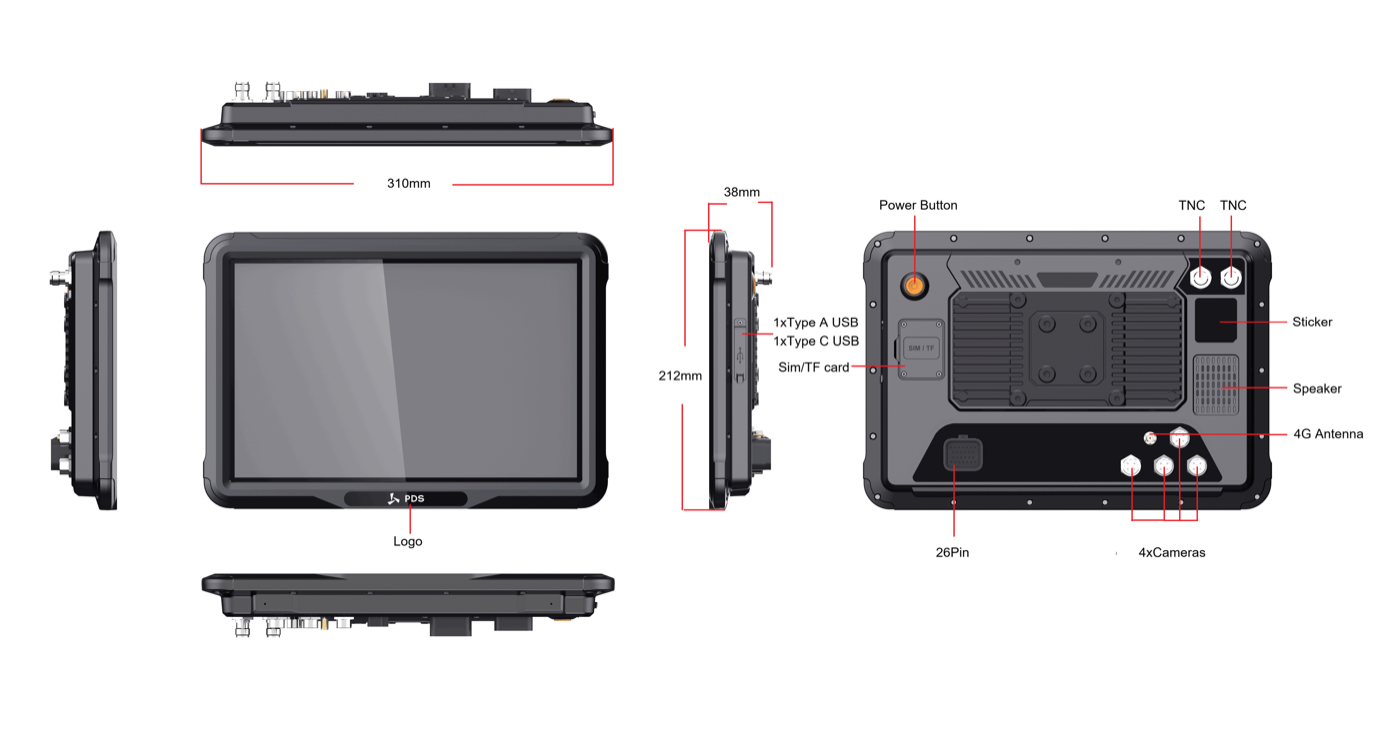
| Published dimensions | 275 x 190 x 47.5 mm | 310 x 212 x 38 mm |
| Operating system | Android 11 or Android 13 | Android 13; optional Linux 5.15 + QT5.15 |
| Processor | Qualcomm QCM6125, 8-core, up to 2.0 GHz | 8-core Cortex-A55, up to 1.8 GHz |
| Published camera capability | Default four-camera configuration; four-channel 720P recording described by PDS | Four aviation camera ports for 1080P camera applications |
| Default vehicle interfaces | Two CAN, two RS232, camera and USB functions | Two CAN, two RS232, RS485, 100M Ethernet and GPIO |
Why a 10-inch vehicle computer works well in fleets
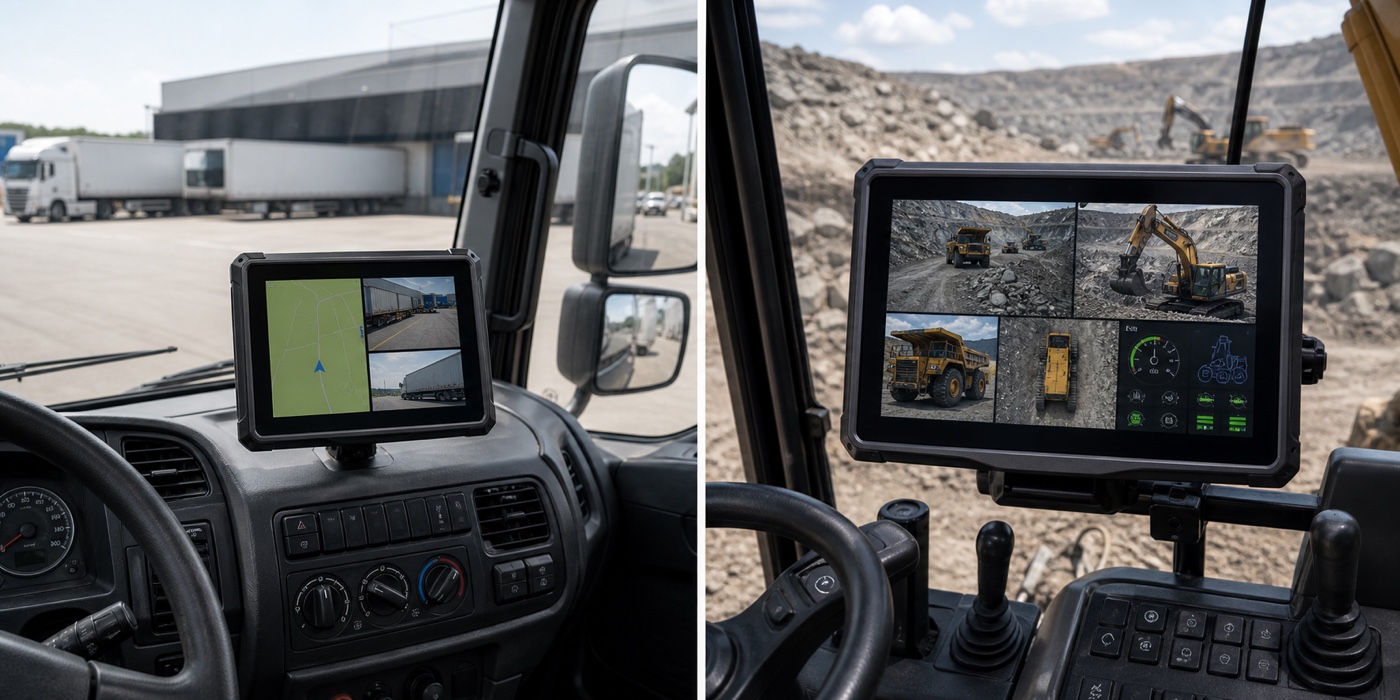
The 10-inch class is large enough for a serious operator interface but small enough for many trucks, buses, tractors, and construction machines. A 10 inch vehicle computer is often a sensible fleet standard when vehicles have different dashboards but need the same software and peripheral set.
Inside the T10Pro is Qualcomm's QCM6125 platform, paired with 4 GB LPDDR4 memory and 64 GB eMMC storage. PDS lists Android 11 and Android 13 builds. In practice, that combination is aimed at touch applications that combine jobs such as route management, field forms, communications, and camera recording. The standard extension list includes four cameras, two CAN channels, two RS232 channels, and USB.
This does not mean every application should activate every interface. Camera recording, navigation, cellular communication, CAN processing, and local storage create a combined workload. The pilot should use the final camera resolution, application build, recording policy, storage card, and connected controllers rather than a simplified demonstration.
Why a 12-inch vehicle computer suits complex machine screens
The PDS T12 adds physical screen area without increasing the published resolution. That means buttons, gauges, camera panels, and warning information can be displayed at a larger physical size. From a longer viewing distance, this can improve scanning and reduce the need to open and close panels.
The larger format makes more sense in excavators, mining vehicles, agricultural machinery, cranes, and autonomous equipment where the terminal acts as a main machine interface. PDS lists Android 13 for the T12 and also offers a Linux 5.15 + QT5.15 option. That choice should be made early, because the application stack, driver work, updates, and validation process will follow different paths.
The T12 connection list is broad: two CAN networks, two RS232 channels, RS485, Ethernet, and GPIO. There are also four aviation camera ports for jobs that need several external views. RTK can be added for guidance or other precision work, although the antenna position, correction source, coordinates, and controller link still need to be engineered as part of the vehicle.
Take the bracket and cable space into the measurement
The published drawings put the T12 at 310 x 212 x 38 mm and the T10Pro at 275 x 190 x 47.5 mm. Those enclosure figures are only the first measurement. Rear connectors, cable bends, the bracket, and the arc needed to tilt the screen all consume space. Add them to the cab drawing before approving the hardware.
A large terminal mounted on a long arm can amplify vibration. Check the bracket rating, vehicle mounting point, fasteners, VESA pattern, and service access. The screen should not obstruct the windscreen, mirrors, emergency controls, labels, or the operator's normal hand movement.
For fleet retrofits, repeat the measurement in every cab generation. A display that fits a new truck may interfere with vents or switches in an older model. Standardizing the software does not always require standardizing one physical size.
Choose the screen around the real application layout
Create interface mock-ups at 1280 x 800 and review them on displays placed at the target viewing distance. For the T10Pro, prioritize the main route, task, or camera view and keep secondary panels available but not permanently open. For the T12, use the extra physical area to maintain important status and camera information without shrinking touch targets.
More visible information is not automatically safer. An operator should be able to understand the screen quickly. Use clear priority, consistent colors, large warnings, and a stable home layout. Remove decorative charts that do not support a decision.
Selection table for common projects
| Project condition | Better starting size | Reason |
|---|---|---|
| Mixed fleet retrofit with limited dashboard space | 10.1 inch | More flexible mounting across vehicle generations |
| Route, task list, and one or two camera panels | 10.1 inch | Enough visual area without a large cabin footprint |
| Four cameras plus machine status and alarms | 12.1 inch | Larger physical panels are easier to scan |
| Dedicated Linux HMI for heavy equipment | 12.1 inch | T12 publishes an optional Linux + QT configuration |
| High-volume Android camera-recording project | 10.1 inch | T10Pro offers a Qualcomm Android platform and camera-oriented interface set |
Pilot the complete installed system
Run the actual application with every planned camera, controller, antenna, storage device, and network connection active. Start and stop the engine repeatedly. Test direct sun, gloves, vibration, ignition-off behavior, network loss, camera interruption, and recovery after a power event. Record what the operator sees and how long the system takes to return to a usable state.
Review the PDS T10Pro and PDS T12 product pages, then send PDS your vehicle drawing, application screenshots, camera plan, interface list, positioning requirement, operating-system preference, and target market. Before approving a 10 inch vehicle computer, check that the operator can reach and read it comfortably while the vehicle is doing its normal job.
Questions buyers usually ask
Does a 12-inch screen show more pixels than the T10Pro?
Both product pages publish 1280 x 800 resolution. The T12 makes the same pixel grid physically larger, which can help viewing distance and touch interaction. Application designers still need to decide what remains on screen.
Can the T10Pro run Linux?
The current T10Pro page lists Android 11 and Android 13. The T12 page lists Android 13 with optional Linux 5.15 + QT5.15. Confirm the exact software build and driver requirements with PDS before development.
Is the larger terminal always more expensive to deploy?
Hardware price is only one part of deployment cost. Brackets, harnesses, installation time, application changes, camera configuration, certification, and vehicle downtime can be more important. Compare the complete installed system.
Contact us
📧Email:[email protected]
📞Tel:+86 13421822024
🌐Website: www.szpds.com
Disclaimer
The information in this article is for reference only. PDS Technology Co., Ltd. assumes no responsibility for errors, omissions, or suitability of the content for specific applications. Product specifications are subject to change without notice. Buyers should verify all technical details with our team before use.
About PDS Technology
PDS Technology is a leading OEM/ODM manufacturer of high-precision RTK GNSS terminals and vehicle computers, serving agriculture, construction, mining, taxi, and logistics industries since 2011.
With 15+ years of automotive-grade R&D experience, we offer rugged, multi-OS (Android/Linux/OpenHarmony) devices featuring RTK centimeter-level positioning, IP66 protection, and AI-ready performance. Our IATF16949-certified factories have produced over 100,000 units deployed globally, holding 30%+ of China's agricultural auto-steering terminal market. We export to Japan, the US, UK, Turkey, Russia, and beyond.





