

A rugged screen can look impressive in a product photo and still be the wrong computer for the vehicle. The difference often appears after installation. Drivers may struggle with an unfamiliar interface, a camera may not work with the selected software, or a small update may require more engineering time than anyone expected.
For buyers comparing an Android vs Linux rugged vehicle computer, the operating system matters because it shapes the whole project: application development, peripheral support, startup behavior, remote updates, operator training, and long-term maintenance.
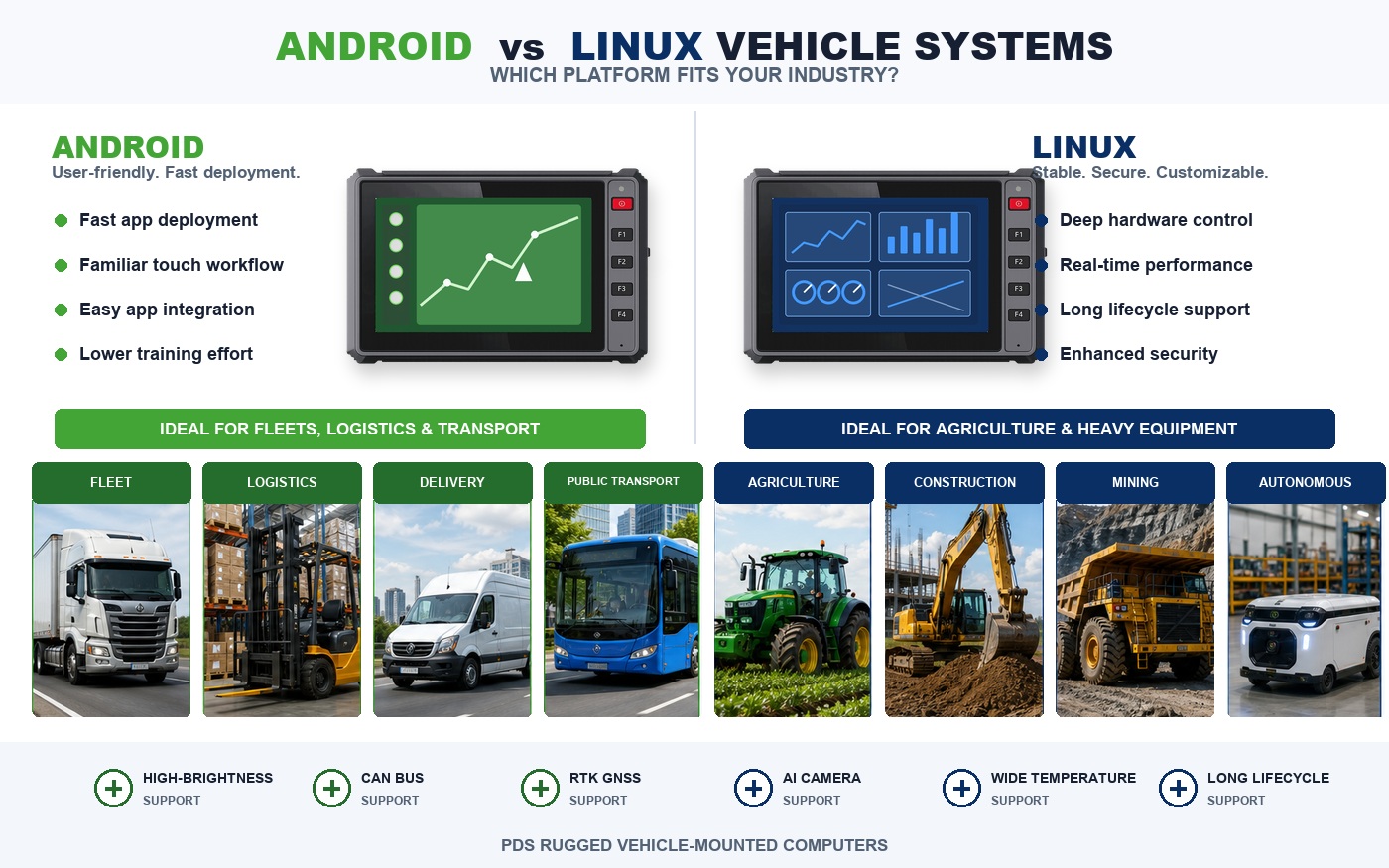
There is no universal winner. Android is often the easier route to a familiar touch experience and app-based workflow. Linux can give an engineering team more control over a dedicated machine system. The better choice is the platform that fits the daily job, the existing software, and the people who will support the terminal after deployment.
Begin with the person in the cab
The most useful comparison starts with the operator, not the operating system.
A delivery driver may open dispatch instructions, navigation, proof-of-delivery forms, messages, and camera views throughout a shift. The terminal needs to feel clear from the first day. Large touch targets, familiar navigation, and a simple home screen can reduce training time and prevent mistakes during a busy route.
A construction or mining operator may use the screen very differently. The terminal could spend most of its time displaying machine status, several camera feeds, alarms, and data from an existing controller. The interface may be purpose-built, while the more important work happens quietly in background services.
Agricultural projects add another variation. A tractor display may show guidance, steering status, field information, and a rear camera. The operator needs immediate feedback when positioning or corrections change. In this setting, a good interface is not merely attractive. It helps the driver understand whether the system is ready and whether the guidance can be trusted.
These examples explain why platform selection should follow the working day. A system chosen only because Android or Linux is familiar to the purchasing team may create problems for the people who actually use and maintain it.
When an Android vehicle mounted computer makes sense
Android is a natural starting point for projects built around a user-facing application. Many software teams already understand Android development, and many drivers recognize its basic interaction patterns.
It often suits:
- fleet dispatch and route-management applications;
- inspection forms and proof-of-delivery workflows;
- driver communication and camera-viewing tools;
- multilingual touch interfaces;
- projects that already have an Android app or mobile development team.
The familiar environment can shorten the distance between a software idea and a usable in-vehicle application. It is also easier for a buyer to demonstrate a new workflow when the screen behaves in a way that drivers recognize.
That convenience should not be confused with consumer-tablet simplicity. An Android vehicle mounted computer still has to work with vehicle power, secure mounting, cameras, CAN Bus, serial equipment, cellular modules, and the customer's application. Kiosk settings, boot behavior, device permissions, update methods, and operating-system support all need to be confirmed for the chosen model.
Android is strongest when the application and operator experience carry most of the project's value. It becomes less convincing when the buyer selects it only because employees already use Android phones.
When a Linux vehicle mounted computer is the better fit
Linux often suits terminals that sit closer to the machine and its control system. An engineering team can shape the software environment around a dedicated application, manage background services, and decide exactly what happens when the vehicle powers on.
Common examples include:
- custom industrial HMI applications;
- machine monitoring and control interfaces;
- terminals connected to several controllers or sensors;
- long-running data collection and communication services;
- specialized positioning, automation, or vision systems.
The main advantage is control. A team can build a focused environment without carrying unnecessary consumer features. Startup, logging, communication services, access permissions, and update behavior can be designed around the machine.
The tradeoff is engineering responsibility. A polished interface, driver support, update process, and long-term maintenance plan do not appear automatically. Cameras, touch panels, GNSS receivers, wireless modules, USB devices, and other peripherals should be tested on the selected hardware early in the project.
A Linux vehicle mounted computer is therefore a good match when the customer has an embedded software team or specialist integrator that wants ownership of the complete platform. For a straightforward app-based fleet workflow, that flexibility can become unnecessary work.
Android vs Linux rugged vehicle computer comparison
The table below gives buyers a practical starting point.
| Project question | Android often fits better | Linux often fits better |
|---|---|---|
| Who uses the screen? | Drivers and operators who need a familiar touch workflow | Operators or technicians using a dedicated machine interface |
| What software already exists? | Android or mobile applications | Embedded, industrial, or Linux-based software |
| What is the terminal's main job? | Dispatch, navigation, forms, communication, and media | Machine integration, control, data processing, and automation |
| How much system control is required? | Managed app environment with standard device settings | Deeper control of services, startup, drivers, and system components |
| Who maintains the software? | Mobile app team or application provider | In-house embedded team or specialist integrator |
| What should be tested first? | App compatibility, permissions, updates, and hardware access | Drivers, peripherals, engineering workload, and maintenance process |
This comparison should narrow the options, not make the final decision. The operating system is only one layer of a rugged vehicle computer.
The details that decide whether the terminal works in the field
Two terminals can run the same operating system and still deliver very different results. Buyers should evaluate the complete installed system.
Peripheral support
A project may need several cameras, a CAN connection, a serial printer, an external GNSS receiver, and 4G communication at the same time. Seeing those interfaces on a datasheet is not enough. The final application should be tested with the actual devices, cables, and workload.
This is particularly important when a camera input vehicle terminal also handles controller data and wireless communication. The screen should remain responsive, and the software should recover predictably if one device is disconnected.
Vehicle power behavior
Vehicle power is not as steady as power on an office desk. Engine starting, ignition changes, voltage variation, and planned shutdown can affect the terminal. The hardware and software should work together so that the system starts reliably, saves data correctly, and does not confuse the operator after a short interruption.
Screen and mounting
Display size should follow the workflow and the cab. A larger screen can help when maps, cameras, and machine status must remain visible together. A smaller display may be easier to mount and more comfortable for a focused application.
Brightness is only part of readability. Buyers should check viewing angle, contrast, interface layout, touch response, and whether the mount blocks the windscreen or existing controls.
Updates and support life
The update plan should be discussed before the first large deployment. Will terminals be updated remotely, at a depot, or during scheduled equipment service? Can a failed version be rolled back? Who supports the application, operating system, and device drivers several years later?
A process that works for 20 vehicles may become difficult at 2,000. Long-term support is especially important for machinery programs that remain in production for years.
Three project examples
A regional delivery fleet
Drivers need routes, delivery confirmation, messages, inspection forms, and occasional camera views. The company already maintains an Android app. Android is the sensible place to begin. The more important checks are mobile-network compatibility, camera support, device management, mounting, and whether the interface remains simple during a busy shift.
A tractor guidance and auto-steering terminal
The display must show guidance clearly and exchange information with positioning and steering hardware. Either platform may work. Android can suit a touch-first product built by an app team. Linux may fit a more controlled system developed by embedded engineers. The controller protocol, positioning architecture, startup time, daylight readability, and recovery behavior matter more than the label on the operating system.
A construction or mining machine
The terminal combines machine status, several cameras, sensor data, and communication with existing ECUs. Linux may provide the control required for a dedicated machine interface. Android can still be appropriate when operator workflow and third-party apps are central. The decision depends on where the project carries the most complexity: the human interface or the machine integration.
How PDS supports platform selection
PDS develops rugged vehicle computers for fleet, agricultural, construction, mining, and other mobile-equipment applications. Project options can include Android or Linux platforms, different display sizes, CAN and serial communication, wireless connectivity, camera input, positioning support, and customized cables or mounts.
The useful starting point is not simply asking for Android or Linux hardware. PDS reviews the intended application, vehicle environment, required peripherals, software ownership, and deployment plan together. This can reveal early whether an existing platform fits or whether the project needs changes to interfaces, firmware, cables, enclosure details, or mounting.
Buyers can explore the PDS rugged vehicle computer range and learn more about the company's engineering and OEM/ODM background.
Common questions
Can the same application run on Android and Linux?
Usually not without development work. Cross-platform frameworks may reuse part of the code, but hardware access, drivers, background services, and interface behavior still need to be tested on the chosen terminal.
Is Android less reliable than Linux in a vehicle?
Reliability depends on the complete product. Power design, thermal performance, hardware drivers, application quality, connectors, and update control all matter. A well-configured Android terminal can be dependable, while a poorly maintained Linux build can create its own problems.
Should the operating system be chosen before the hardware?
The two decisions should be made together. Existing software may narrow the platform choice, while cameras, interfaces, screen size, processing load, power requirements, and expected service life determine which hardware can support the application.
Choose the platform your team can support
The best Android vs Linux rugged vehicle computer is the one that keeps the complete project manageable. Android often helps a team deliver a familiar, driver-friendly application more quickly. Linux can give engineers deeper control over a dedicated machine system.
Neither advantage matters if the terminal cannot connect to the required hardware, fit the vehicle, or remain supportable after deployment. Begin with the daily job, the software already available, and the team responsible for updates. The platform choice usually becomes clearer after those questions are answered.
To discuss a rugged vehicle-computer project, contact PDS.
Contact us
📧Email:[email protected]
📞Tel:+86 13421822024
🌐Website: www.szpds.com
Disclaimer
The information in this article is for reference only. PDS Technology Co., Ltd. assumes no responsibility for errors, omissions, or suitability of the content for specific applications. Product specifications are subject to change without notice. Buyers should verify all technical details with our team before use.
About PDS Technology
PDS Technology is a leading OEM/ODM manufacturer of high-precision RTK GNSS terminals and vehicle computers, serving agriculture, construction, mining, taxi, and logistics industries since 2011.
With 15+ years of automotive-grade R&D experience, we offer rugged, multi-OS (Android/Linux/OpenHarmony) devices featuring RTK centimeter-level positioning, IP66 protection, and AI-ready performance. Our IATF16949-certified factories have produced over 100,000 units deployed globally, holding 30%+ of China's agricultural auto-steering terminal market. We export to Japan, the US, UK, Turkey, Russia, and beyond.





