

A tractor auto steering terminal sits where several engineering decisions meet. It shows the guidance path, reports positioning quality, exchanges data with the steering controller, and gives the operator a clear way to supervise the job. Choosing one from a specification sheet alone is risky. A terminal that looks impressive on a desk may be awkward in a narrow cab, difficult to read at noon, or unable to exchange the right messages with the vehicle.
This guide is for tractor manufacturers, auto-steering developers, agricultural equipment integrators, and buyers preparing a pilot. The practical question is not “Which screen is best?” It is “Which complete configuration will work on this tractor, with this steering system, in these fields?”
1. Start with the buyer requirements
Before requesting a quotation, write down the job. Include the tractor model, electrical system, cab drawing, steering method, target crops, field size, expected travel speed, and operating region. Note whether the operator follows visual guidance or supervises automatic steering. Those two use cases may share a GNSS receiver, but their control responsibilities are different.
Mounting space is often the first real constraint. Measure the clear area around the windshield, steering wheel, mirrors, levers, and existing displays. Record the normal viewing distance and whether the screen must be used with gloves. A compact GNSS guidance terminal for tractors may be a better fit than a larger display if it keeps controls visible and avoids a long, flexible bracket.
The requirement sheet should also name the correction source. Network RTK needs mobile coverage, credentials, a compatible protocol, and a plan for reconnecting after an interruption. A local base and radio link introduce antenna, frequency, range, and regional compliance questions. Do not leave the correction path as an accessory to be chosen after the terminal.
2. Separate guidance from steering control
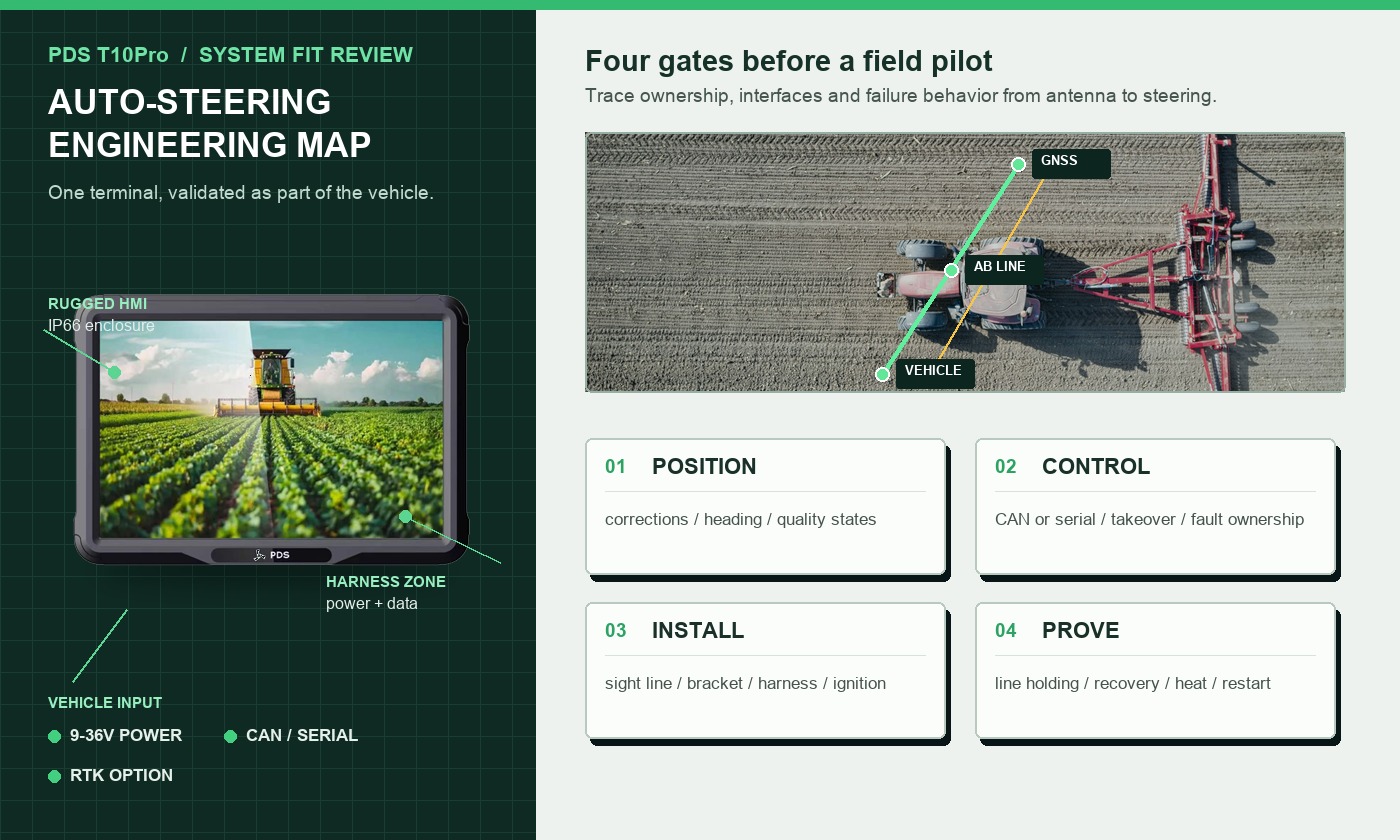
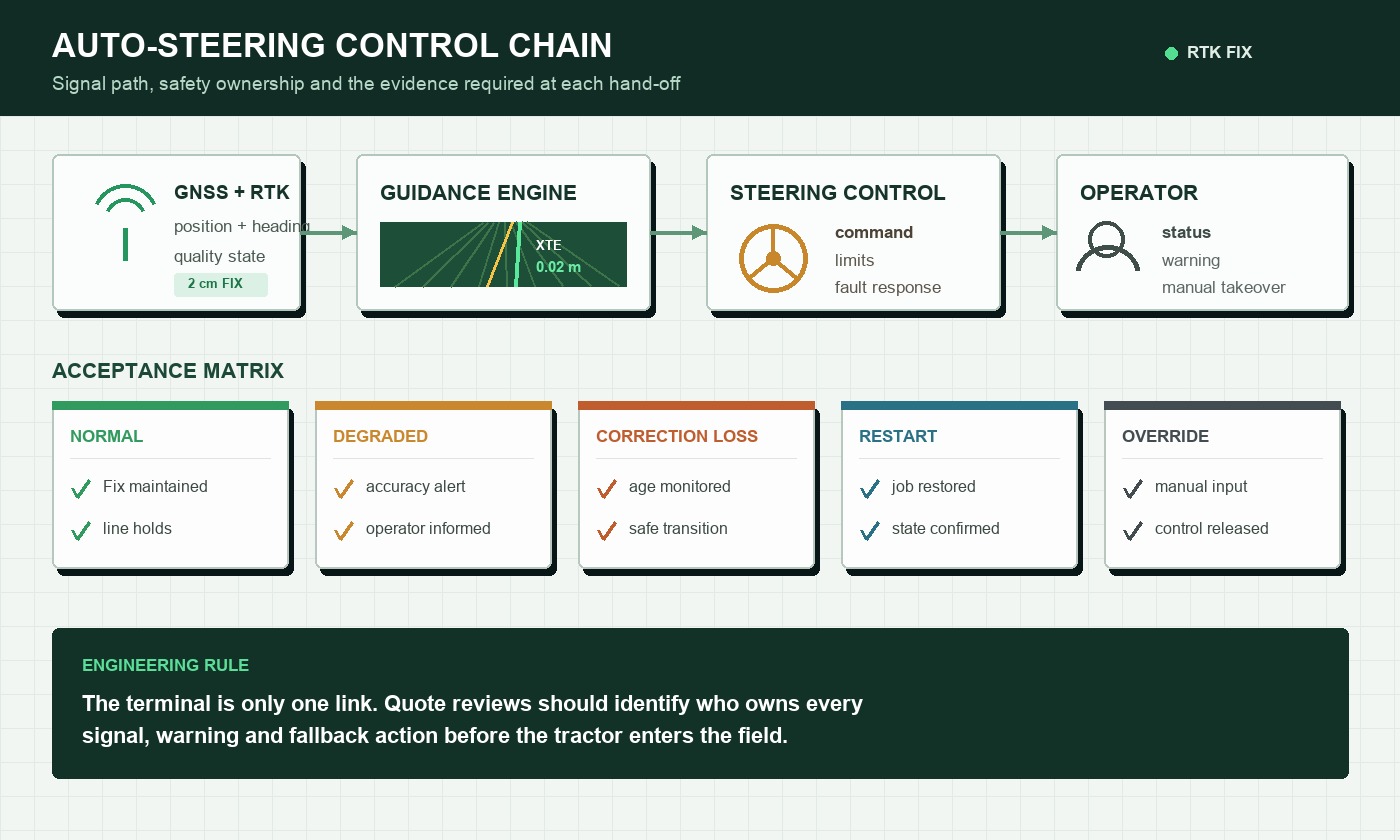
The terminal and the steering controller may be separate devices, or their functions may be packaged within one project. Either way, define the boundary. The GNSS receiver estimates position and heading. The application compares the tractor with a planned path. A controller turns cross-track error into steering commands. The operator needs visible status, warnings, and a reliable manual takeover.
This distinction matters during procurement. Ask who owns the steering algorithm, who supplies the CAN or serial protocol, and what the terminal does when position quality degrades. If correction data stops, does the screen warn immediately? Does steering disengage in a predictable way? Can the operator still see the last safe guidance state? These behaviors belong in the acceptance test, not in an informal discussion.
For a tractor auto steering terminal project, put each of those control boundaries into the interface document before software and harness work begin.
3. Key positioning specifications
Centimeter-level RTK positioning is a system result. Satellite visibility, antenna placement, correction latency, receiver configuration, multipath, and the application all affect field performance. Ask suppliers to describe the conditions behind an accuracy statement and to explain how the terminal reports fixed, float, and standalone states.
For auto-steering, heading behavior deserves equal attention. A single-antenna system may derive heading from motion; a dual-antenna arrangement can provide heading at low speed, but requires a known antenna baseline and careful installation. Specify update rate, required outputs, initialization time, and recovery after driving beside trees or buildings. The GPS.gov overview of augmentation systems is a useful reminder that accuracy, integrity, and availability are related but distinct concerns.
4. Display and operator controls
Agricultural work produces glare, dust, vibration, long shifts, and quick decisions at headlands. Review the real software screens at the intended viewing distance. Important values such as correction status, cross-track error, speed, alarm state, and steering engagement should remain legible without forcing the operator to study the display.
Brightness is only one part of outdoor readability. Reflections, viewing angle, cover glass, dimming range, color contrast, and the mounting angle all matter. If the operator wears gloves, test the production touch settings and physical keys. Night operation also needs a low enough backlight and an interface that does not fill the cab with glare.
5. Vehicle interfaces and power
List every connection by function. A request for “CAN” is incomplete without bitrate, message ownership, termination, connector, isolation requirements, and the expected driver or API. Apply the same discipline to RS232, RS485, Ethernet, USB, cameras, GPIO, GNSS outputs, modems, and radios.
Vehicle power needs its own drawing. Confirm the input range, ACC behavior, fuse, ground, cranking response, reverse-polarity protection, and shutdown sequence. Decide whether the application must save a job when ignition is removed and how long the terminal may remain awake. A stable 9–36V input range is useful across many tractor platforms, but the complete harness and vehicle conditions still require validation.
6. Ruggedness is more than an IP number
An agricultural auto steering terminal should be evaluated as an installed system. IP66 protection can address dust and water under defined test conditions, but exposed connectors, cable entries, bracket holes, and damaged seals can still become weak points. Ask which configuration was tested and whether its connectors were mated.
Temperature, vibration, shock, UV exposure, chemicals, and pressure washing may also matter. Review the expected cab temperature after parking in the sun, not only the outdoor air temperature. A display that operates in the morning but dims or restarts after several hours is not ready for a working season.
7. A comparison checklist for shortlisted terminals
| Area | Evidence to request | Field question |
|---|---|---|
| Positioning | Receiver model, antenna plan, correction protocol, quality outputs | How quickly does the system recover near obstructions? |
| Display | Brightness data, touch mode, viewing sample | Can the operator read and use it at noon and at night? |
| Vehicle I/O | Pinout, harness drawing, protocol documentation | Does the production unit communicate with the target controller? |
| Power | Input range, ACC sequence, protection and current draw | What happens during cranking and rapid key cycles? |
| Mechanical fit | Dimensions, bracket drawing, connector clearance | Does it stay readable and stable over rough ground? |
| Lifecycle | Software support, change control, repair and warranty plan | Can the same configuration be supported through rollout? |
8. PDS configurations to review
For a compact tractor cab and a focused guidance interface, the PDS T7 provides a 7-inch format with front function keys, Android or Linux options, optional UM982 RTK, IP66 protection, and 9–36V vehicle power. Its size can help where mounting space and operator sight lines are tight.
The PDS T10Pro is a stronger starting point when an auto-steering application needs more screen area, Android 11/13, optional UM482 or UM982 RTK, an optional 410–470 MHz radio, camera inputs, and multiple CAN or serial connections. Exact interface combinations should be confirmed against the project BOM.
For a large multi-view HMI, the PDS T12 offers a 12.1-inch display, Android or Linux options, optional RTK, dual CAN, serial, Ethernet, GPIO, and up to four camera connections. It belongs on the shortlist when the operator must see guidance, implement information, alarms, and camera views together.
9. Recommended configurations by project type
There is no universal “best” terminal, but a sensible starting configuration can shorten the pilot:
- Visual guidance in a compact cab: 7-inch terminal, clear function keys, single-antenna RTK where motion-derived heading is acceptable, and a rigid short bracket.
- Retrofit auto-steering: 10-inch Android terminal, RTK receiver matched to the correction source, documented CAN or serial link to the controller, and a tested ignition-safe shutdown.
- Integrated OEM tractor: terminal and harness designed into the cab, controlled software image, production traceability, defined message ownership, and a component-change process.
- Multi-function precision farming: 12-inch terminal where maps, cameras, implement data, and work records need simultaneous visibility.
10. Run the pilot in a real field
A bench test can confirm booting and communications. It cannot prove a tractor installation. Use the intended bracket, cables, antennas, correction service, steering controller, and software image. Work a normal field with straight passes, headlands, slopes, rough sections, and partial sky obstruction.
Record initialization time, fixed-solution availability, line holding, pass-to-pass behavior, correction recovery, screen readability, touch response, connector stability, and temperature. Repeat engine starts. Interrupt the correction link. Confirm that warnings are understandable and that manual takeover works without hesitation. Keep logs, photos, firmware versions, and antenna measurements with the test result.
Frequently asked questions
Does a larger screen improve auto-steering accuracy?
No. Screen size affects usability, not the underlying positioning result. Accuracy depends on the receiver, antennas, correction data, installation, algorithms, and working conditions. Choose the display size for the operator and the number of views that must remain visible.
Can one terminal work on different tractor brands?
Often, but the harness, mounting, steering interface, power behavior, and vehicle messages may differ. Treat each tractor platform as a configuration that needs documented wiring and a short acceptance test.
What should be frozen before mass production?
Freeze the terminal BOM, receiver, modem or radio, antenna and cable part numbers, connector pinout, bracket, software image, protocol version, test limits, labeling, packaging, and change-control process.
Choose the installed system, not just the display
The right tractor auto steering terminal is the one that fits the cab, receives dependable corrections, communicates with the steering system, survives the vehicle environment, and tells the operator what is happening. Build the shortlist from requirements, then let the real field decide.
Review the PDS agricultural auto-steering solution, browse the PDS vehicle terminal range, or contact PDS Technology to discuss a tractor terminal, harness, RTK configuration, or OEM/ODM project.
Contact us
📧Email:[email protected]
📞Tel:+86 13421822024
🌐Website: www.szpds.com
Disclaimer
The information in this article is for reference only. PDS Technology Co., Ltd. assumes no responsibility for errors, omissions, or suitability of the content for specific applications. Product specifications are subject to change without notice. Buyers should verify all technical details with our team before use.
About PDS Technology
PDS Technology is a leading OEM/ODM manufacturer of high-precision RTK GNSS terminals and vehicle computers, serving agriculture, construction, mining, taxi, and logistics industries since 2011.
With 15+ years of automotive-grade R&D experience, we offer rugged, multi-OS (Android/Linux/OpenHarmony) devices featuring RTK centimeter-level positioning, IP66 protection, and AI-ready performance. Our IATF16949-certified factories have produced over 100,000 units deployed globally, holding 30%+ of China's agricultural auto-steering terminal market. We export to Japan, the US, UK, Turkey, Russia, and beyond.





