

An agriculture vehicle computer brings positioning, machine data, cameras, operator input, and work records together inside the cab. That sounds straightforward until the machine loses mobile coverage, the engine is restarted during a job, dust settles around a connector, or an operator has to read four types of information while approaching a headland.
Precision agriculture projects succeed when the computer is selected around the working day. Processing power matters, but so do the bracket, power sequence, operating system image, interfaces, display angle, offline behavior, and service plan. This article looks at the device as part of the vehicle rather than as a tablet fixed to the dashboard.
1. Industry challenges inside agricultural vehicles
Farm machinery works across long seasons and short operating windows. When weather and field conditions are right, a vehicle may run for many hours with little time for technical support. The cab computer must tolerate vibration, heat, dust, repeated ignition cycles, and changing network coverage while keeping the current job intact.
The information load is also growing. A single screen may need to show a field map, RTK state, implement rate, machine alarms, camera video, and task progress. Displaying everything at once can be as harmful as showing too little. The application and screen size should be planned around what the operator needs during straight work, turns, transport, setup, and troubleshooting.
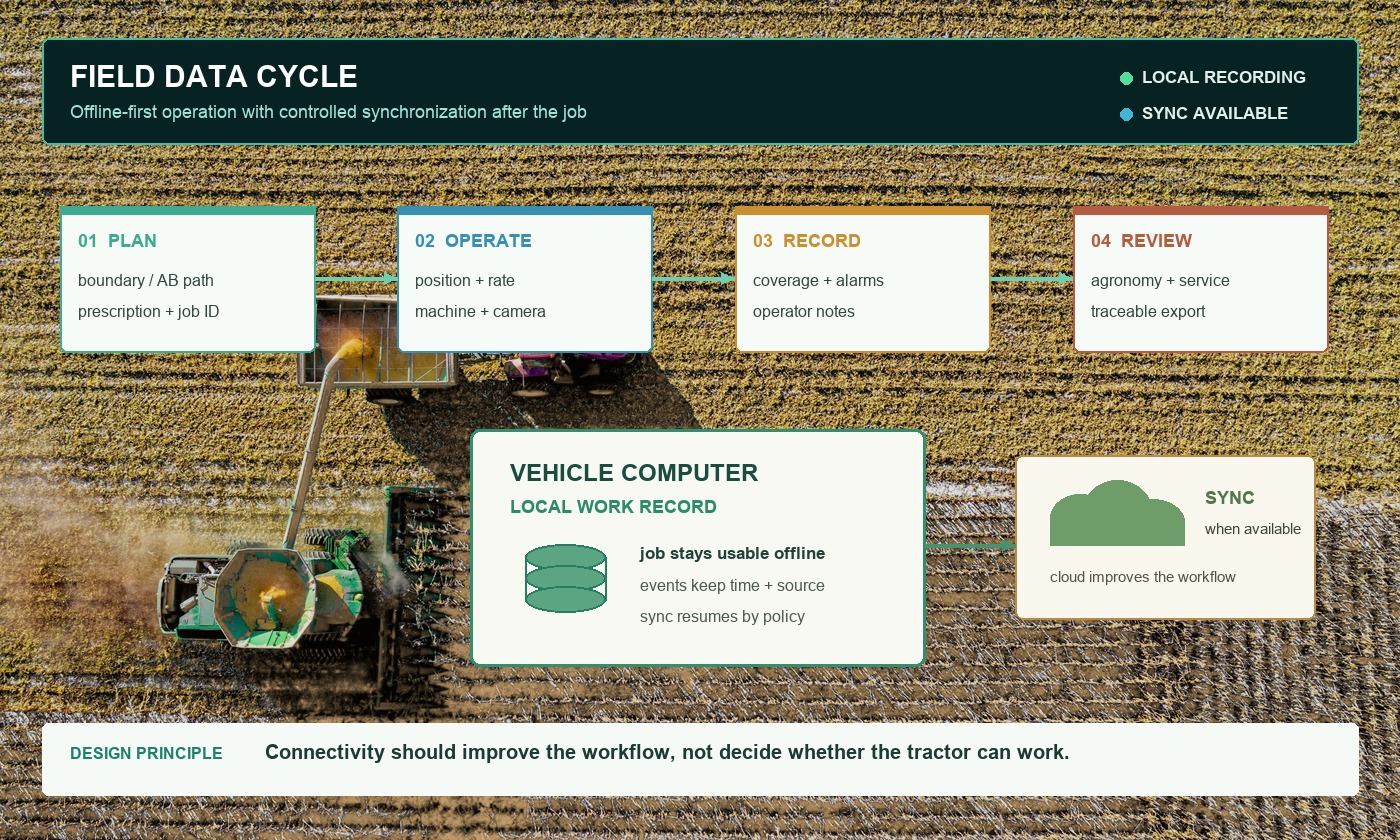
Data introduces another challenge. Boundaries, guidance lines, prescriptions, coverage, material rates, and operator notes may come from different systems. Decide which records are authoritative, where they are stored when offline, and how duplicates or interrupted uploads are handled. Connectivity is valuable, but a weak signal should not stop the core field task.
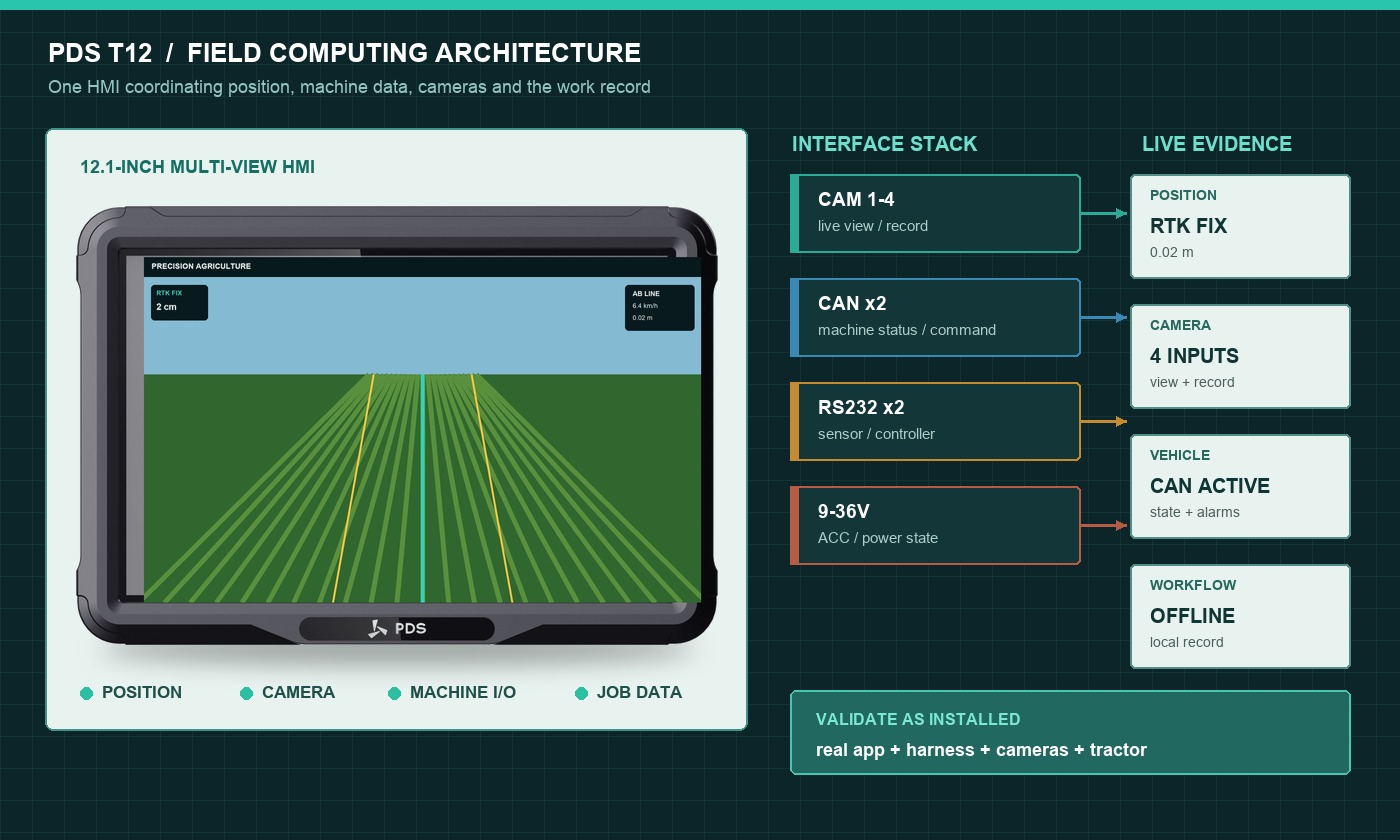
2. Device requirements begin with the workflow
Map one complete job before choosing hardware. Start when the operator enters the cab. Note login, field selection, implement setup, correction connection, job start, guidance, rate changes, alarms, pauses, refilling, headland turns, job completion, synchronization, and shutdown. This sequence exposes requirements that a processor comparison will miss.
For example, a camera may need to appear automatically when reversing. An alarm may need a physical acknowledgement. A job record may need to survive immediate power loss. A supervisor may need to export logs through USB when mobile coverage is unavailable. Each event should have an owner and a test case.
3. Display size and HMI design
A compact screen works well for a focused task, while a 10- or 12-inch display can support maps, machine status, and cameras together. The best vehicle computer for agriculture is not automatically the largest one. A large unit may block the windshield or require a long bracket; a small unit may force constant switching between views.
Test application screenshots at the expected viewing distance. Check text size, contrast, touch targets, glove use, reflections, and night dimming. Critical alerts should not depend on color alone. If the machine vibrates, small controls become harder to select, so the interface needs generous touch areas and a stable mount.
4. Processing, memory, and storage
Estimate workload from the real application: map rendering, GNSS updates, implement messages, video decoding, local database writes, wireless synchronization, and background services. Run these together on the production OS image. A smooth map during an isolated demo does not prove the system can also record data and display cameras through a hot afternoon.
Memory headroom is important for long-term stability and future application versions. Storage should be sized for offline jobs, logs, map packages, images, and update files. Define what happens when storage becomes nearly full. The system should protect active work and make cleanup understandable to service staff.
5. GNSS and RTK integration
A precision-agriculture computer may include an internal receiver, connect to an external receiver, or support both. Confirm antenna connectors, correction protocols, GNSS outputs, update rate, time synchronization, and the way the application reads quality states. Do not reduce the interface to latitude and longitude; operators also need to know whether the solution is fixed, floating, corrected, or standalone.
If RTK corrections arrive through the terminal's modem, test reconnection after coverage loss and after ignition cycles. If a UHF radio is used, confirm frequency, antenna placement, range, and market regulations. For dual-antenna heading, document the baseline and calibration procedure.
6. Vehicle and implement interfaces
A capable industrial vehicle computer should match the required machines, not simply list many ports. For CAN, confirm channel count, bitrate, isolation, termination, connector pinout, and message ownership. For serial devices, define RS232 or RS485 electrical behavior, protocol, baud rate, and cable length.
Ethernet may connect cameras, controllers, or service tools. USB can support updates and export, but exposed ports need a sealing plan. GPIO can read switches or drive simple outputs, provided voltage levels and protection are correct. Camera inputs require matching video standards, connector types, channel count, and application behavior.
7. Power, boot, and shutdown behavior
Agricultural vehicles do not provide laboratory power. Engine cranking, load changes, charging systems, long cable runs, incorrect wiring, and repeated key cycles all affect the computer. Confirm input range, ACC wiring, fuse, reverse-polarity protection, transient behavior, and standby current.
The software team should define the entire ignition sequence. How quickly must the application become usable? Is the previous job reopened? What is saved when ACC turns off? Is there a controlled shutdown delay? Can an operator restart the engine without corrupting field records? These questions should be answered during the pilot.
8. Environmental and mechanical design
A rugged vehicle computer needs evidence for the environment in which it will be installed. Review ingress protection, operating temperature, storage temperature, vibration, shock, UV exposure, and connector retention. Ask whether tests cover the complete quoted configuration with connectors mated.
Mounting affects reliability and usability at the same time. A rigid bracket reduces motion, but it must not transmit excessive stress into the housing. Leave space for cable bends and service access. Route harnesses away from pedals, steering joints, hot surfaces, sharp edges, and high-current electrical lines.
9. Recommended PDS features and models
| Use case | PDS model to review | Relevant starting features |
|---|---|---|
| Focused guidance in a compact cab | T7 | 7-inch display, front keys, Android/Linux, optional UM982 RTK, IP66, 9–36V |
| Map, RTK, cameras, and Android application | T10Pro | 10.1-inch display, Android 11/13, optional RTK and radio, camera and vehicle interfaces |
| Large multi-view agricultural HMI | T12 | 12.1-inch display, Android/Linux, optional RTK, dual CAN, serial, Ethernet, GPIO, four cameras |
| Mid-size vehicle-mounted application | T8 | 8-inch 1280×800 display, Android 10, 4GB/64GB, IP66, 9–36V, configurable vehicle I/O |
The model name is only the beginning. Confirm the production processor, memory, storage, OS version, GNSS option, modem or radio, camera standard, connector pinout, harness, and mounting parts in the quotation. OEM/ODM changes should be documented with validation, minimum order quantity, lead time, and component-change control.
10. Application example: a field application terminal
Consider a tractor running a variable-rate application. Before entering the field, the operator selects a boundary and prescription. The computer confirms RTK state, implement connection, product selection, and available storage. During work, it displays the path, target rate, actual rate, covered area, alarms, and a rear camera when required.
Mobile coverage disappears at the far end of the field. The job continues from local data. The computer records position, rate, alarms, and operator changes with timestamps. When connectivity returns, it synchronizes the completed sections without duplicating records. At shutdown, the active job is committed before power is removed.
This example creates testable requirements: offline operation, local storage, RTK quality handling, implement messages, automatic camera switching, controlled shutdown, and synchronization recovery. It is far more useful than a request for a “fast Android display.”
11. Pilot and production checklist
- Run the production application, map data, cameras, GNSS, vehicle messages, and wireless synchronization at the same time.
- Test cold starts, rapid key cycles, cranking, low voltage, and controlled shutdown.
- Work in direct sun and after the cab heats up; check brightness and touch response.
- Interrupt mobile data, corrections, one camera, and one vehicle interface; verify useful warnings and recovery.
- Fill local storage toward its limit and confirm that active jobs remain protected.
- Inspect the bracket, cable routes, connectors, and antenna installation after rough field work.
- Freeze the hardware BOM, OS image, application version, harness drawing, and acceptance limits before volume production.
Frequently asked questions
Should an agriculture vehicle computer always include an internal RTK receiver?
No. An internal receiver simplifies some designs, while an external receiver may suit an existing architecture or specialized antenna arrangement. Decide who owns positioning, corrections, outputs, time synchronization, and diagnostics.
Is Android or Linux better for precision agriculture?
Both can work. The correct choice depends on the application framework, drivers, security policy, update method, developer experience, and lifecycle requirements. Test the actual production image and peripherals.
How much display brightness is enough?
There is no universal number. Review brightness together with reflections, optical construction, viewing angle, application colors, mounting position, and cab shading. A sample in the target cab provides better evidence than a number alone.
Design around the working day
The right agriculture vehicle computer keeps the field task moving when conditions are inconvenient. It presents the right information, talks to the machine, preserves data, survives power and environmental stress, and can be supported through production. Start with the workflow, prove it in a complete installation, and freeze the configuration that passed.
Explore the PDS precision agriculture solution, browse the PDS vehicle computer range, or contact PDS Technology to discuss interfaces, RTK, cameras, software, harnesses, and OEM/ODM requirements.
Contact us
📧Email:[email protected]
📞Tel:+86 13421822024
🌐Website: www.szpds.com
Disclaimer
The information in this article is for reference only. PDS Technology Co., Ltd. assumes no responsibility for errors, omissions, or suitability of the content for specific applications. Product specifications are subject to change without notice. Buyers should verify all technical details with our team before use.
About PDS Technology
PDS Technology is a leading OEM/ODM manufacturer of high-precision RTK GNSS terminals and vehicle computers, serving agriculture, construction, mining, taxi, and logistics industries since 2011.
With 15+ years of automotive-grade R&D experience, we offer rugged, multi-OS (Android/Linux/OpenHarmony) devices featuring RTK centimeter-level positioning, IP66 protection, and AI-ready performance. Our IATF16949-certified factories have produced over 100,000 units deployed globally, holding 30%+ of China's agricultural auto-steering terminal market. We export to Japan, the US, UK, Turkey, Russia, and beyond.





