

A one-inch difference sounds minor until a vehicle computer is mounted beside a steering column, hydraulic control, radio, and windscreen pillar. In a compact cab, the smaller display may preserve the driver's view and leave room for cables. Move into a roomy machine cab and the balance changes: the extra screen area can save an operator from opening and closing panels all day.
When a buyer puts a 7 inch vehicle computer beside an 8-inch model, the diagonal number is only the start. I would put the mounting footprint, resolution, key layout, connector access, application screen, and normal viewing distance on the same worksheet. The right answer depends on what the operator really needs to see while the vehicle is moving.
7-inch and 8-inch screens solve slightly different problems
A 7-inch terminal is usually selected because space is tight or the workflow is focused. Think of a route screen, a dispatch message, one reversing camera, a delivery form, or a single machine page. An 8-inch terminal leaves the designer a little more breathing room for a map and status panel, yet it still avoids the footprint of a 10-inch display.
The PDS T7 and T8 show why buyers should look beyond the diagonal measurement. Both publish high-brightness IPS touch displays and vehicle-grade power input, but the enclosure layout, resolution, memory, operating system, and front controls are different.
| Selection point | PDS T7 | PDS T8 |
|---|---|---|
| Display | 7-inch IPS, 1024 x 600 | 8-inch IPS, 1280 x 800 |
| Published brightness | At least 750 cd/m2 | At least 750 cd/m2 |
| Front layout | Power key plus four function keys | Clean touch-first bezel |
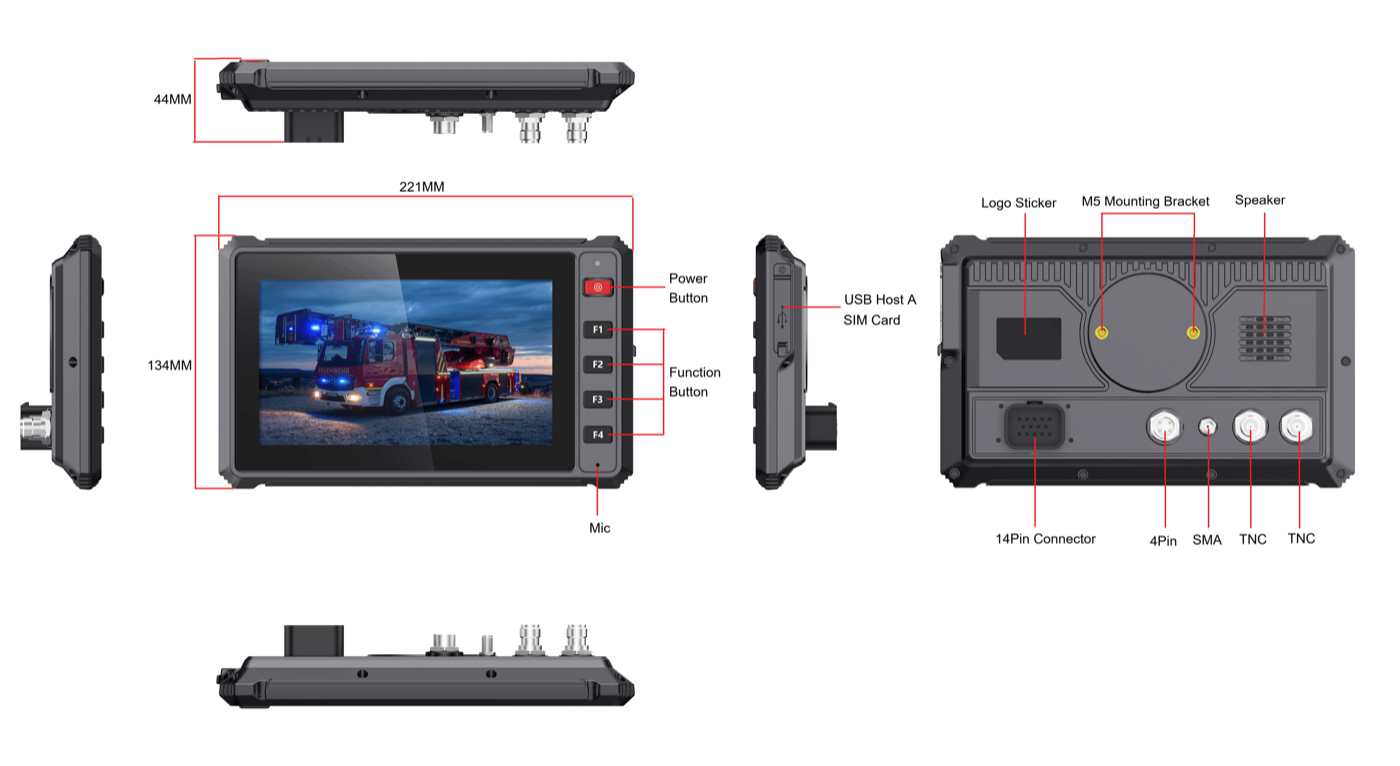
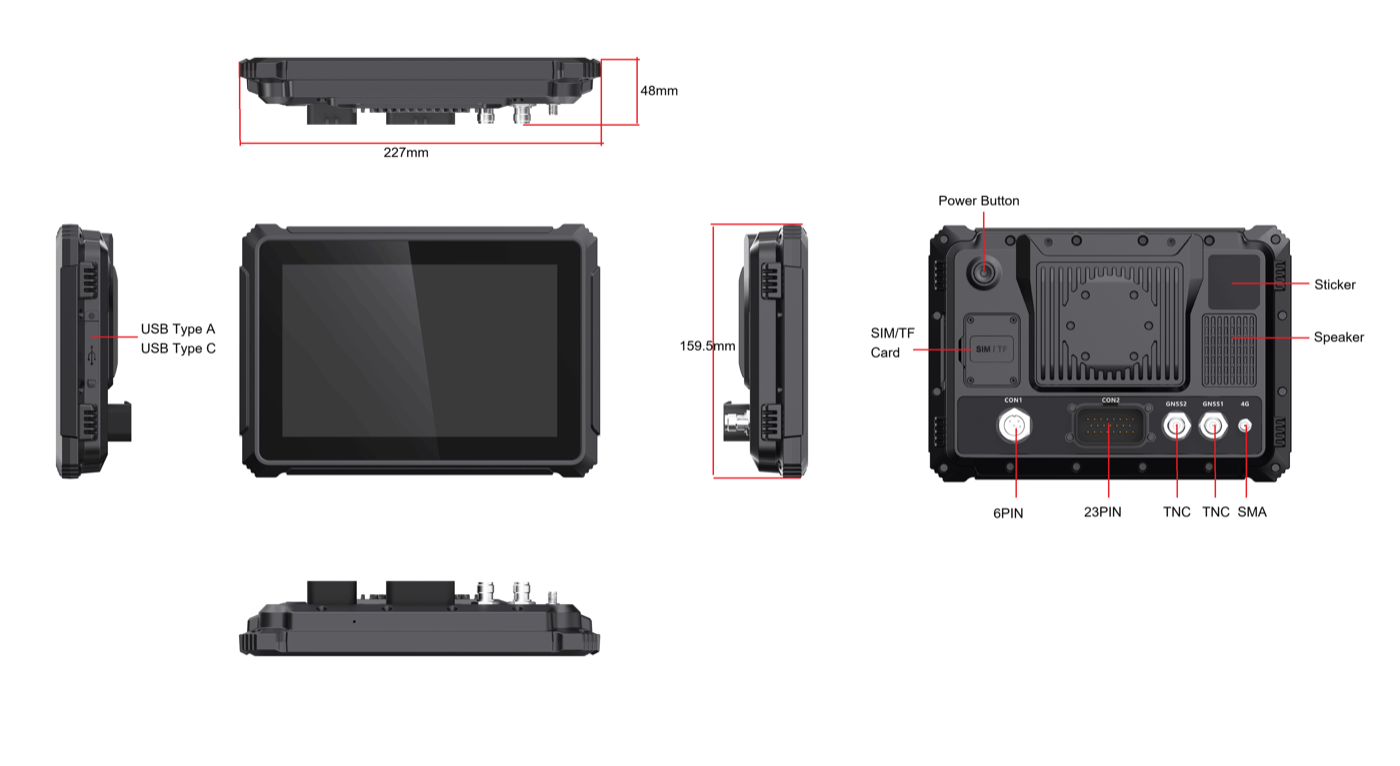
| Published dimensions | 220 x 134 x 29 mm; 44.15 mm at the highest point | 227 x 159.5 x 48 mm |
| Operating system | Android 10 or Linux 4.9 + QT5 | Android 10 |
| Memory and storage | 2 GB / 16 GB | 4 GB / 64 GB |
| Published power and protection | 9-36V DC, IP66 | 9-36V DC, IP66 |
When a 7-inch vehicle computer is the better fit
The strongest reason to use a 7-inch terminal is not price. It is installation discipline. A 7 inch vehicle computer is easier to place in taxis, light trucks, small tractors, utility vehicles, and older cabs where the dashboard was never designed for another large screen.
The T7's front function keys can also matter in a moving vehicle. A driver wearing gloves may prefer one physical key for a camera, emergency message, page change, or frequently used machine function. Physical keys do not eliminate touch interaction, but they can reduce the number of precise taps needed for repeated actions.
A smaller screen works best when the application has a clear hierarchy. The main task should occupy most of the display. Secondary information can open only when requested. If the interface tries to show a full route map, four camera feeds, machine alarms, and a detailed status table at the same time, a compact screen becomes crowded.
When an 8-inch vehicle computer earns the extra space
An 8-inch screen sits in a useful middle ground. The cab may reject a 10-inch unit, while the application still feels cramped on seven inches. PDS pairs the T8's 1280 x 800 panel with 4 GB of memory and 64 GB of storage, so an Android project has room for split panels, a larger map, camera preview, and local records.
The T8's published default extension configuration includes one camera, one CAN channel, one RS485 interface, Ethernet, power, and ACC. This can fit fleet, agricultural, construction, or equipment-monitoring projects that combine an operator application with vehicle data and a single camera.
The catch appears during installation. The T8 is only 7 mm wider than the T7, but it is 25.5 mm taller and the enclosure is deeper. That changes the bracket load, clearance above switches, and room behind the screen. A useful drawing therefore shows connectors and the cable bend, not a lonely front rectangle.
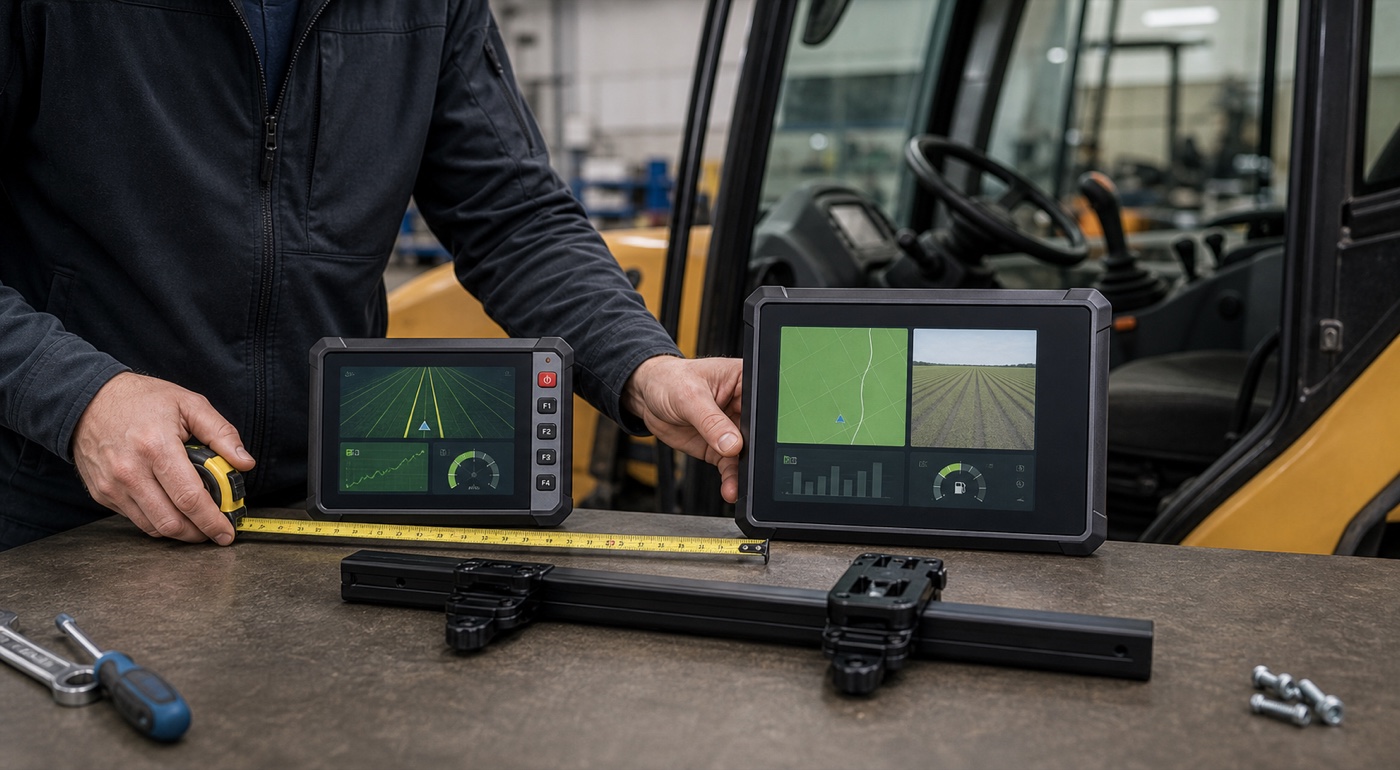
Compare the interface before comparing the hardware
Ask the software team for screenshots at the real target resolution. Laptop mock-ups are deceptive; 1024 x 600 and 1280 x 800 expose different spacing problems. Check the smallest label, the awkward map button, the warning banner, and the camera window, then view the screen from the driver's seat rather than from a desk.
Gloves, sunlight, vibration, and vehicle movement change how quickly an operator can find a control. The safer layout usually uses fewer persistent elements, larger touch zones, clear contrast, and a predictable home screen. Do not solve a poor interface by automatically buying a larger display.
Mounting and cable access can decide the result
Before requesting a quotation, photograph the proposed mounting area and record the available width, height, depth, and viewing angle. Mark any switch, air vent, pillar, mirror, joystick, or safety notice that cannot be blocked. Include the bracket and the full cable harness in the measurement.
There is a low-tech check that catches mistakes surprisingly early. Cut two pieces of cardboard to the front dimensions of the T7 and T8, tape each one to the proposed bracket position, and sit in the cab for ten minutes. Reach for the normal controls. Look through the windscreen and mirrors. Put on the gloves used during the shift. Then ask another operator to repeat the exercise. A drawing may say both sizes fit, while the cardboard version reveals that one covers a heater switch or forces the driver to lean forward. It is not a substitute for a powered sample, but it is a useful filter before cables and brackets are ordered.
A longer mounting arm makes a display easier to position, but it can also increase vibration. The heavier or larger terminal may need a shorter arm or a stronger mounting point. Check whether the operator can reach the screen while seated and whether the terminal can be serviced without removing other dashboard parts.
A practical selection checklist
- Use a 7-inch model when the cab is narrow and the application has one primary task.
- Consider an 8-inch model when maps, camera preview, or split information panels need more space.
- Choose physical keys only when they support real repeated actions; do not add them without a workflow.
- Test the application at the published screen resolution, not on a desktop mock-up.
- Measure bracket, connector, cable bend, driver sightline, and service clearance together.
- Run a pilot with the actual camera, CAN device, serial accessory, GNSS antenna, and 4G module.
Which PDS model should you start with?
Start with the PDS T7 if the project needs a compact Android or Linux terminal, front function keys, and a focused operator screen. Start with the PDS T8 if the project needs an 8-inch Android display, more memory and storage, and a touch-first interface with vehicle connectivity.
Neither model should be approved from a specification table alone. If a 7 inch vehicle computer is on the shortlist, send PDS the vehicle type, mounting photo, application screenshots, interface list, camera count, destination market, and expected quantity. That information allows the hardware recommendation to follow the installed workflow.
Frequently asked questions
Is an 8-inch vehicle computer always easier to use?
No. It provides more screen area, but the benefit depends on the application layout and viewing distance. A well-designed 7-inch interface can be clearer than a crowded 8-inch interface.
Can the same application run on the PDS T7 and T8?
An Android application may be adaptable to both, but the processor platform, memory, resolution, permissions, connected devices, and operating-system build must be tested. The T7 also offers a Linux option, while the T8 page lists Android 10.
Do both models support vehicle power?
Both publish 9-36V DC input and IP66 protection. The complete installation still depends on the supplied harness, ignition behavior, fuse, connectors, and the electrical conditions in the target vehicle.
Contact us
📧Email:[email protected]
📞Tel:+86 13421822024
🌐Website: www.szpds.com
Disclaimer
The information in this article is for reference only. PDS Technology Co., Ltd. assumes no responsibility for errors, omissions, or suitability of the content for specific applications. Product specifications are subject to change without notice. Buyers should verify all technical details with our team before use.
About PDS Technology
PDS Technology is a leading OEM/ODM manufacturer of high-precision RTK GNSS terminals and vehicle computers, serving agriculture, construction, mining, taxi, and logistics industries since 2011.
With 15+ years of automotive-grade R&D experience, we offer rugged, multi-OS (Android/Linux/OpenHarmony) devices featuring RTK centimeter-level positioning, IP66 protection, and AI-ready performance. Our IATF16949-certified factories have produced over 100,000 units deployed globally, holding 30%+ of China's agricultural auto-steering terminal market. We export to Japan, the US, UK, Turkey, Russia, and beyond.





